Quick Answer
Product Details
A research-based review of EscapeBook All-In: Studio + Every Creator Upgrade, covering documented features, license limits, AI-art caveats and buyer checks. Not independently tested.
- EscapeBook Studio plus every creator upgrade: Cover Prompt Studio, Series Builder, Theme Vault, Etsy & Classroom Kit and 50 AI credits.
- Product category: Training/Course
- Buyer check: compare the official feature list with your needs.
- Buyer check: confirm supported devices and platforms.
- Buyer check: review account and setup requirements.
- Buyer check: check current access and delivery details.
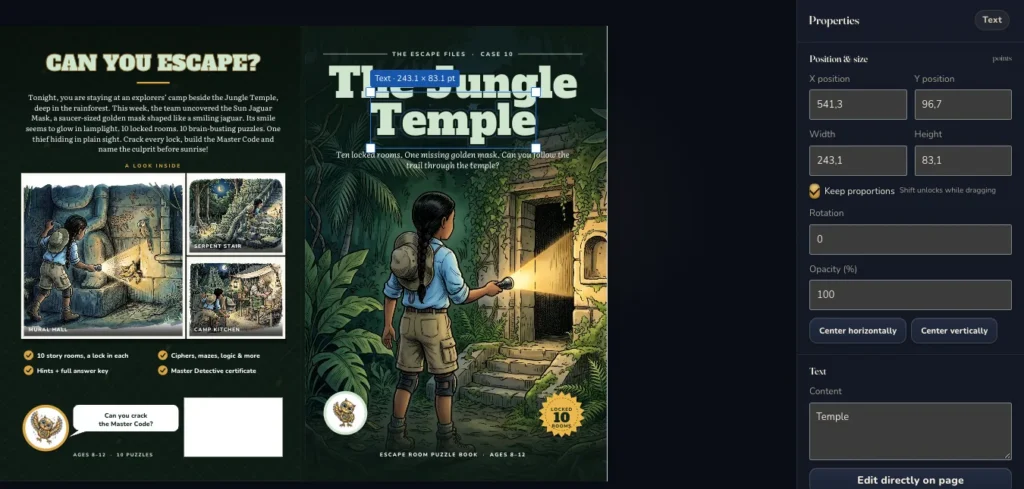
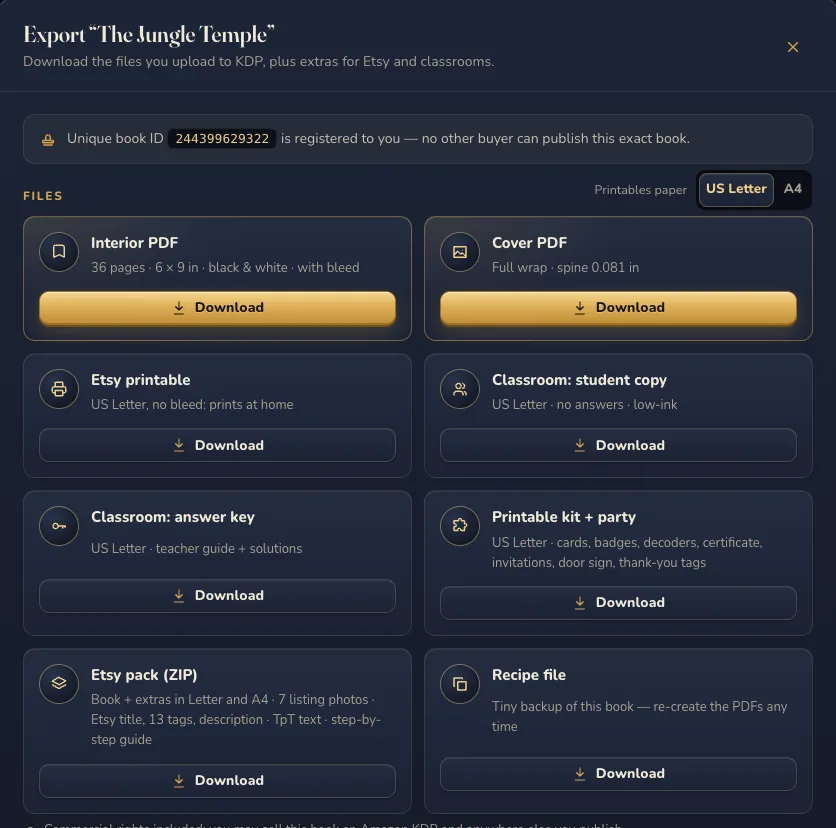
Quick answer: EscapeBook All-In: Studio + Every Creator Upgrade is a bundled digital package that, according to the vendor, combines the EscapeBook Studio app with a set of add-on creator tools (Cover Prompt Studio, Series Builder, Theme Vault, Etsy & Classroom Kit and an AI credit pack).
Product Overview
What it is: Based on the official product page and vendor documentation, EscapeBook All-In: Studio + Every Creator Upgrade is an offer that bundles the EscapeBook Studio core web app with multiple creator upgrades. The vendor states the bundle includes the core studio plus tools the vendor calls Cover Prompt Studio, Series Builder (with Fast Start), Theme Vault worlds, an Etsy & Classroom Kit, and 50 AI credits for the studio’s Theme Creator.
What problem it aims to solve: The package is positioned for small publishers, children’s-book creators and KDP/Etsy sellers who want a single environment to assemble illustrated escape-room-style children’s books, generate covers and produce printable assets for multiple marketplaces.
Evidence basis: Documented facts in this review are taken from the official product pages and legal pages linked on the vendor site (product page, license, terms, refund policy). Statements that reflect the vendor’s marketing copy are attributed as vendor claims.
Key Features
Directly documented or vendor-stated features include:
- EscapeBook Studio (hosted web app) with multiple world templates and a KDP-ready export workflow — documented on the official pages.
- Series Builder with a Fast Start function that the vendor says can produce multiple finished books/series elements — described on the product page.
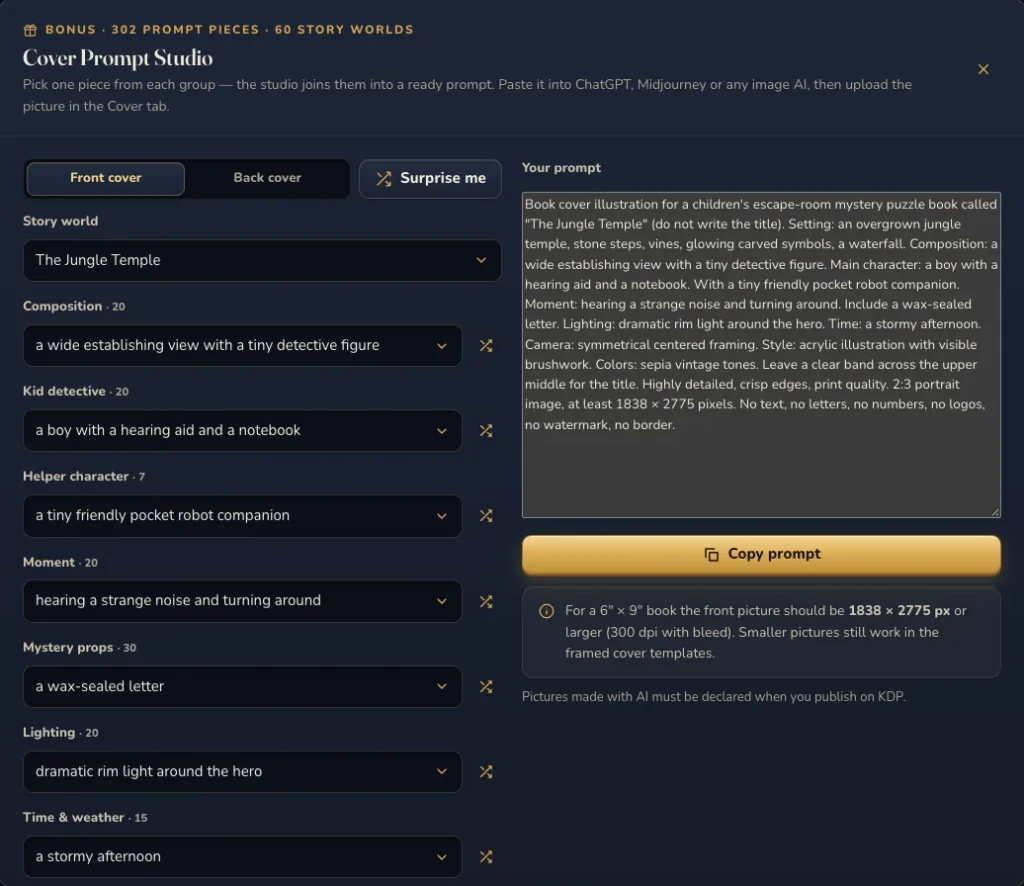
- Cover Prompt Studio: a prompt-builder for front/back cover prompts sized to KDP trims — vendor-stated on the product page.
- Theme Vault / additional illustrated worlds and puzzle engines added to the library — vendor-stated.
- Etsy & Classroom Kit: listing-ready assets (descriptions, tags), teacher guides and printable kits for non-KDP marketplaces — vendor-stated.
- AI Credit Pack (50 credits) for the Custom Theme Creator inside the app, usable when the vendor’s credits are included or when a buyer uses their own API key — documented in the Terms of Use page.
- Commercial-use license for finished books/PDFs created with the purchased features, subject to the license terms — documented in the commercial license page.
Limitations and Risks
Known limitations, based only on the provided documentation:
- License limits: The commercial license grants rights to sell finished books but disallows redistribution of the software, raw art assets, templates or extracted artwork as standalone packs. The license page explicitly warns buyers they cannot claim exclusive ownership of library images; some library art is AI-generated and may not qualify for exclusive copyright in every jurisdiction — documented official license text.
- AI artwork caveat: The license and terms note the library art is AI-generated; buyers are told to review AI content and disclose AI use where marketplaces require it — documented official text.
- Local storage risk: The Terms of Use state books are saved in the browser and advise regular export/backups because clearing browser storage can delete local work — documented official text.
- Service availability: The vendor warns that maintenance or third-party outages can interrupt the hosted service — documented in Terms of Use.
- Missing independent verification: This review is research-based and not independently tested. Any feature described as a vendor claim remains unverified by first-hand testing in this article.
Who This Is For
Best for
- Self-publishers who want KDP-ready PDFs and a bundled set of content-generation tools in one hosted app (based on vendor descriptions).
- Creators who plan to sell finished books or printables and need a commercial-use license that allows selling finished works built from the product’s features (documented license).
- Users who value quick-start templates, a Series Builder that claims to produce ready books, and marketplace-specific assets (vendor-stated).
Not ideal for
- Buyers who require full, exclusive ownership of images and raw artwork files — the license forbids claiming exclusivity of library images, and some art is AI-generated.
- Users who prefer local-first desktop apps: the studio is a hosted web app and stores data in the browser, per the Terms of Use.
- Existing EscapeBook Studio customers who already own the core product: the vendor page explicitly advises them not to buy the All-In bundle since it includes the studio again (vendor claim).
Pricing and Licensing
Documented licensing: The official Commercial License page describes what buyers may and may not do with finished books, clarifies AI-artwork considerations, and disallows redistribution of raw assets. That license text is part of the verified documentation used for this review.
Pricing and bundle price: The product page presents a bundle price and per-item list price as vendor marketing copy. These price statements are vendor-provided and should be verified on the seller’s current offer page before purchase; this review treats them as vendor claims and does not independently confirm current pricing or promotions.
Refunds and support: The vendor maintains a documented Refund Policy and support contact information on the product site. Because refund and eligibility details can change, check the official seller pages for current terms before buying. This review does not assert or promise any refund term.
Alternatives and Comparisons
What to compare when evaluating alternatives: Look for other KDP-oriented book builders, children’s-activity/printable creators, or standalone cover prompt tools. Compare: export quality and formats, licensing for commercial resale, whether story/puzzle engines are included, AI-image policy, and where user data is stored (hosted vs local).
Why those points matter: Licensing and AI-art rights affect where you can sell and whether you can claim exclusivity. Export formats and KDP-ready settings affect upload success. Hosted vs local storage changes backup procedures and data control.
Practical workflows: how to use this bundle day-to-day (step-by-step guidance)
Below are practical, reader-focused workflows that map vendor-stated features to realistic tasks. These are intended to help you evaluate whether the EscapeBook All-In bundle fits your process, and to reduce risk when using a hosted, browser-saved authoring tool. The workflows assume the vendor-stated components (EscapeBook Studio, Series Builder, Cover Prompt Studio, Theme Vault, Etsy & Classroom Kit, AI credit pack) are present as described on the official product pages and license documents; those feature statements are vendor-provided and documented on the seller site.
Workflow A — Produce a single KDP-ready children’s activity book (low-volume self-publishers)
- Plan: Outline number of pages, general story/activity sequence, trim size, and whether you will use the vendor’s illustrated Theme Vault art or supply your own images. (The commercial license on the official pages explains resale rights and restrictions for library images.)
- Create inside EscapeBook Studio: Use a world template from the Theme Vault and add puzzles or interactive elements using the studio’s puzzle engines (vendor-stated). Build pages and check layout at the declared KDP-ready trim sizes in the Cover Prompt Studio or export settings.
- Generate cover prompts: Use the Cover Prompt Studio (vendor-stated) to produce front/back cover prompt text sized for KDP trims, then use your chosen image-generation workflow or the studio’s Theme Creator (if you have AI credits or an API key) to create cover art. Remember that the vendor notes some library art is AI-generated and the commercial license restricts exclusivity claims.
- Export and backup: Export a KDP-ready PDF and immediately save a local copy. The Terms of Use warn that the studio stores work in browser storage and advise regular exports/backups; do not rely on the browser alone for long-term storage.
- Verify license compliance: Review the commercial license documentation (official page) to confirm you may sell the finished PDF and that you are not redistributing raw assets or claiming exclusive ownership of library images.
- List on KDP and other marketplaces: Use the Etsy & Classroom Kit assets (vendor-stated) to adapt listing descriptions and teacher guides for non-KDP marketplaces if you sell printables directly.
Workflow B — Rapid series creation for multiple small-format books (volume creators who want speed)
- Series planning: Draft a theme and a set of core templates before entering the Series Builder. The vendor states the Series Builder (with Fast Start) can produce multiple finished books or series elements; treat that as a vendor claim unless you can verify it firsthand.
- Use Series Builder: Import or select a Theme Vault world and run Fast Start to generate a first draft for several books. Expect to edit and refine each output—vendor claims speed, not final perfection.
- Standardize exports: Create consistent export presets for trim, bleed, and internal formatting so each book exports to KDP-ready PDFs with minimal rework.
- Quality control: Because the output is templated and possibly AI-assisted, manually proof each book for layout issues, broken assets, or content that might require disclosure under marketplace AI rules (the license and terms document AI-art caveats).
- Backup and versioning: Export bundles and keep a local version history. The app stores data in the browser and the Terms of Use recommend regular exports to avoid loss from cleared storage or browser changes.
Limitations you must plan around
Use the vendor-provided documentation as your baseline. The review’s documentation highlights several vendor-documented limitations; treat these as constraints to build processes around rather than as outright blockers:
- Browser-local saves: The app stores project data in the browser. Risk: clearing browser storage, using a different browser profile, or browser updates could remove in-progress work. Mitigation: adopt a rigorous export schedule and keep local backups of exported PDFs and source files.
- Hosted-service interruptions: The Terms of Use note the studio is hosted and subject to maintenance or third-party outages. Mitigation: do critical work outside of scheduled maintenance windows when feasible and export periodically.
- Non-exclusivity of library art and AI-art caveat: The commercial license and terms state that library images (some AI-generated) cannot be claimed as exclusively owned in all jurisdictions. Mitigation: if you need exclusive artwork, use commissioned art or use your own image generation with a cleared commercial license outside the product library. Always read the license’s AI statements located on the official commercial license page.
- No raw-asset redistribution: The license forbids reselling raw source files and library assets as asset packs. Mitigation: plan product offerings around finished PDFs, bundles and printed books rather than selling extracted images or art packs taken from the library.
Buyer fit matrix — who benefits most and who should be cautious
Below are concise fit scenarios that pair buyer goals to the verified product statements and documented limitations. These originate from the official product pages and license/terms documents cited in the review.
Good fit
- Solo authors/publishers who want a hosted, template-driven tool to create illustrated activity/children’s books with KDP-ready exports and marketplace-oriented assets. The product pages document KDP-ready export workflows and the Etsy & Classroom Kit.
- Small teams or solo entrepreneurs who need a single environment to generate covers, internal pages and printable assets and are comfortable with a hosted app model (vendor-stated).
- Creators who accept the commercial license limits (allowed to sell finished works but not raw asset redistribution) and who do not require exclusive ownership of library images.
Not a good fit
- Publishers requiring exclusive ownership of all illustrations and templates — the license explicitly warns that some library art is AI-generated and exclusivity may not be possible.
- Teams that must keep all source files and project data on local servers under their own version-control systems. The studio is a hosted web app that stores projects in browser storage per the vendor Terms of Use.
- Users who cannot tolerate service downtime; because it is hosted, short interruptions can block editing until service resumes.
Comparisons: what to weigh against alternatives
When comparing EscapeBook All-In to other options, evaluate these vendor-documented dimensions and how they affect your work:
- Export formats and marketplace readiness: The product pages claim KDP-ready exports. Compare that claim to the explicit export features of alternatives—some tools offer more manual control over bleeds, color profiles, or printer-specific marks than hosted kits.
- Licensing model and AI-art policy: The official commercial license text restricts raw asset resale and cautions about AI art. If you rely on exclusive rights or resalable asset packs, a tool with clearly owned, human-created assets or custom commissioning may be preferable.
- Data locality and backup strategy: The Terms of Use document the browser-local storage behavior. Alternatives that are desktop-based or that integrate with cloud storage you control (Dropbox/Google Drive) might be better if you need corporate-grade backup and audit trails.
- Production speed vs customization: Vendor claims Series Builder and Fast Start speed series creation. Decide whether you prefer speed (templated outputs) or deeper manual control (standalone layout apps such as desktop publishing software or professional page layout tools). The vendor statements about Series Builder are cited on the official product pages.
Frequently asked questions (FAQ) — evidence-based answers and where to check
Q: Can I sell books made with the EscapeBook All-In bundle?
A: According to the published Commercial License on the vendor site (documented in the review), you may sell finished books and PDFs created with the purchased features. The license, however, restricts redistribution of raw assets and library images; read the license text on the official commercial license page for exact limits.
Q: Are library images exclusive to me?
A: No — the vendor’s license text states you cannot claim exclusive ownership of library images and further notes some library art is AI-generated, which may have implications for exclusive copyright in some jurisdictions. That language is included in the official license and terms documentation cited in the review.
Q: Where is my in-progress book stored?
A: The Terms of Use indicate that project data is stored in the browser by default. The vendor recommends regular exports and backups because clearing browser storage could remove project data. That recommendation appears in the official Terms of Use documentation.
Q: What happens if the hosted service has an outage?
A: The vendor’s Terms of Use acknowledge that hosted services can have maintenance or third-party outages. They advise exporting work regularly. If service availability is critical for your workflow, consider combining EscapeBook’s hosted features with local backups or use alternative desktop tools during outages.
Q: Are the AI credits transferable or usable with my own API key?
A: The Terms of Use and product documentation state the bundle includes an AI credit pack for the studio’s Theme Creator and that buyers can also use their own API key. These are vendor-documented feature statements; check the product pages and Terms of Use for any usage limits or how the credits are applied.
Q: Is there support or a refund policy if something goes wrong?
A: The vendor maintains a Refund Policy and support contact information on the product site (documented by the review). Because refund and support terms can change, always verify current refund and support details on the official seller pages before purchasing. This review does not assert any refund period or guarantee.
Checklist before you buy
Use this short checklist based on the documented facts and vendor claims to confirm fit before purchasing:
- Confirm current bundle contents and pricing on the official product page (the review treats price statements as vendor-provided and not independently verified).
- Read the Commercial License and Terms of Use for AI-art caveats, resale restrictions, and data-storage notes.
- Decide whether you need exclusive ownership of art or raw files; if yes, plan to use commissioned art or your own image assets instead of library images.
- Plan a backup/export routine because projects are stored in your browser per the Terms of Use.
- If you require high uptime, evaluate the hosted-service model and have a contingency plan for maintenance or outages.
- Confirm how the included AI credits work and whether you need to supply your own API key for continued use.
Notes on evidence: Feature descriptions above that reference specific product functions (Studio, Series Builder, Cover Prompt Studio, Theme Vault, Etsy & Classroom Kit, AI credits, commercial license language, and browser-storage behavior) are drawn from the official product pages, Terms of Use and commercial license documentation supplied by the vendor and cited in the original review.
Related reading: LittleWiz Studio Review: Can You Customize? · Kids Activity Book Engine Review: What Is the Catch? · Holiday Complete Puzzle Book Review: Can It Make Sense?
Final Verdict
Summary recommendation: Based on the official product pages and legal documents, EscapeBook All-In bundles the core EscapeBook Studio app with tools that the vendor says speed up book and asset creation for KDP, Etsy and classroom markets. The documented commercial license permits selling finished books made with purchased features but restricts redistribution of raw assets and notes AI-generated library art may not be exclusively copyrightable in every jurisdiction.
Who should consider it: Buyers who want a hosted, template-driven workflow for creating illustrated puzzle/escape-style books and who accept a hosted app model, AI-art caveats and the license limits should inspect the official product page and license text closely before buying.
What to check before you buy: Confirm current pricing and what is included on the seller’s offer page; verify whether you already own the studio core; read the commercial license regarding AI artwork and resale rights; export or backup your in-progress work often since the app saves to browser storage; and verify current support/contact channels.
According to the vendor, the bundle includes the items listed above; where the vendor makes pricing or promotional claims, those are presented here as vendor claims and not as independently confirmed facts.
Affiliate disclosure: ReviewScoutLab may earn an affiliate commission if you buy through links on this page, at no extra cost to you.
Disclosure: This article may contain affiliate links. If you purchase through them, we may earn a commission at no extra cost to you.
30 practical AI Tools bonus guides for EscapeBook All-In
Access is sent after a qualifying purchase is verified.
Explore 80 practical eBooks packed with guides, templates and checklists selected for AI Tools - 30 Practical Guides.
Discover helpful shortcuts, ideas and ready-to-adapt resources you might otherwise spend hours gathering separately.
Purchase eligibility is verified before bonus access is sent. Affiliate link.
ChatGPT Smart Start
Clear steps and worksheets for better choices.
Prompting That Works
A practical toolkit without exaggerated claims.
AI Research Workflow
Useful examples for everyday work.
AI Content Planner
Understand the essentials and common pitfalls.
AI Email Drafting
Turn important ideas into a workable plan.
AI Image Prompts
Make smarter decisions with a simple checklist.
AI Video Planning
Clear steps and worksheets for better choices.
Build AI Assistants
A practical toolkit without exaggerated claims.
No-Code AI Agents
Useful examples for everyday work.
Everyday AI Automation
Understand the essentials and common pitfalls.
AI Spreadsheet Shortcuts
Turn important ideas into a workable plan.
AI Presentation Builder
Make smarter decisions with a simple checklist.
View the remaining 68 bonus books
Responsible AI Basics
Clear steps and worksheets for better choices.
AI Fact Checking
A practical toolkit without exaggerated claims.
AI Customer Support
Useful examples for everyday work.
AI SEO Workflows
Understand the essentials and common pitfalls.
AI for Freelancers
Turn important ideas into a workable plan.
AI Business Brainstorming
Make smarter decisions with a simple checklist.
AI Meeting Notes
Clear steps and worksheets for better choices.
Your AI Productivity Stack
A practical toolkit without exaggerated claims.
Automated Content Calendars
Useful examples for everyday work.
AI Writing Editor
Understand the essentials and common pitfalls.
AI Data Summaries
Turn important ideas into a workable plan.
AI Workflow Mapping
Make smarter decisions with a simple checklist.
Small Business AI
Clear steps and worksheets for better choices.
Choose the Right AI Tool
A practical toolkit without exaggerated claims.
Reusable AI Prompt Libraries
Useful examples for everyday work.
Privacy With AI
Understand the essentials and common pitfalls.
AI Testing Checklist
Turn important ideas into a workable plan.
AI Learning Companion
Make smarter decisions with a simple checklist.
500 ChatGPT Prompts for Business
Original 50-book bonus library resource
300 Prompts for Digital Marketers
Original 50-book bonus library resource
Automation for Beginners
Original 50-book bonus library resource
100 Practical Business Ideas
Original 50-book bonus library resource
Mastering ChatGPT for Productivity
Original 50-book bonus library resource
Content Creation Blueprint
Original 50-book bonus library resource
200 Image Generation Prompts
Original 50-book bonus library resource
Video Creation Master Guide
Original 50-book bonus library resource
50 Digital Tools for Entrepreneurs
Original 50-book bonus library resource
How to Build No Code Business Agents
Original 50-book bonus library resource
SEO Mastery Beginner to Advanced
Original 50-book bonus library resource
Affiliate Marketing Complete Blueprint
Original 50-book bonus library resource
100 Free Backlink Building Strategies
Original 50-book bonus library resource
Keyword Research for Beginners
Original 50-book bonus library resource
Google Ranking Checklist
Original 50-book bonus library resource
On Page SEO Optimization Guide
Original 50-book bonus library resource
Technical SEO Made Simple
Original 50-book bonus library resource
Affiliate Marketing With Smart Automation
Original 50-book bonus library resource
Blogging for Affiliate Income
Original 50-book bonus library resource
100 Profitable Affiliate Niches
Original 50-book bonus library resource
Digital Marketing Blueprint 2026
Original 50-book bonus library resource
Facebook Marketing Master Guide
Original 50-book bonus library resource
Instagram Growth Strategies
Original 50-book bonus library resource
YouTube Channel Growth Blueprint
Original 50-book bonus library resource
Pinterest Traffic Generation
Original 50-book bonus library resource
365 Social Media Content Ideas
Original 50-book bonus library resource
Email Marketing Automation Guide
Original 50-book bonus library resource
Lead Generation for Beginners
Original 50-book bonus library resource
Google Ads Beginners Handbook
Original 50-book bonus library resource
Copywriting That Converts
Original 50-book bonus library resource
100 Online Business Ideas
Original 50-book bonus library resource
How to Sell Digital Products
Original 50-book bonus library resource
Start a Profitable Blog
Original 50-book bonus library resource
Freelancing With Digital Tools
Original 50-book bonus library resource
Print on Demand Business Guide
Original 50-book bonus library resource
Dropshipping for Beginners
Original 50-book bonus library resource
Build an Online Course With Smart Tools
Original 50-book bonus library resource
How to Create and Sell eBooks
Original 50-book bonus library resource
Ecommerce Business Blueprint
Original 50-book bonus library resource
Build a One Person Online Business
Original 50-book bonus library resource
WordPress Website Creation Guide
Original 50-book bonus library resource
100 Canva Design Ideas
Original 50-book bonus library resource
Landing Page Conversion Secrets
Original 50-book bonus library resource
Website Speed Optimization
Original 50-book bonus library resource
Build Websites Without Coding
Original 50-book bonus library resource
Sales Funnel Building Blueprint
Original 50-book bonus library resource
100 High Converting Email Templates
Original 50-book bonus library resource
Website Security for Beginners
Original 50-book bonus library resource
Smart Website Builder Master Guide
Original 50-book bonus library resource
250 Ready to Use Marketing Templates
Original 50-book bonus library resource
Bought EscapeBook All-In: Studio + Every Creator Upgrade Through Our Affiliate Link? We’re Here to Help
If you purchased EscapeBook All-In: Studio + Every Creator Upgrade through our affiliate link and you experience any problem with the product, you are welcome to contact us.
Whether you need help with installation, accessing the product, understanding how a feature works, contacting the product owner or vendor, reporting a technical problem, locating your purchase, requesting a refund, or dealing with another issue related to EscapeBook All-In: Studio + Every Creator Upgrade, we will do our best to guide you toward the appropriate solution.
You can contact ReviewScoutLab directly:
WhatsApp: +91 7889856565
Email: support@reviewscoutlab.com
We want readers who purchase through our affiliate links to know that our relationship does not end after the click. If you have a genuine problem, contact us and we will try to help you understand the next steps or reach the appropriate seller, platform, or support team.