Quick Answer
Product Details
TripDoodle converts OpenStreetMap data into printable puzzle pages and listing text for self-publishers. Good for quick KDP interiors; confirm live pricing and package details before buying.
- Publishing & KDP
- Pick a place, build the book, download the PDF.
- Product category: Publishing & KDP
- TripDoodle turns the real street map of a city into print-ready puzzle pages for Amazon KDP.
- Buyer check: compare the official feature list with your needs.
- Buyer check: confirm supported devices and platforms.
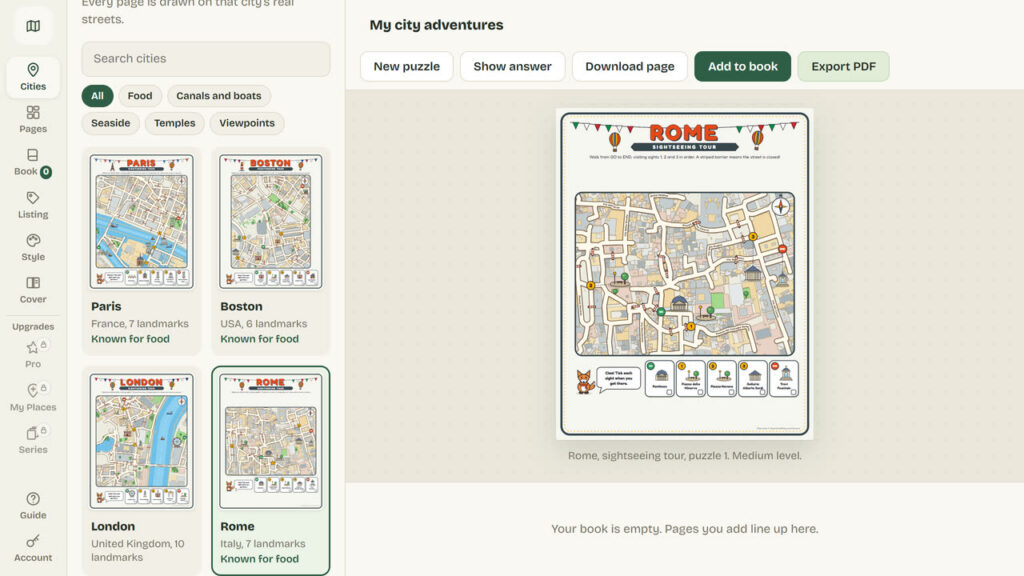
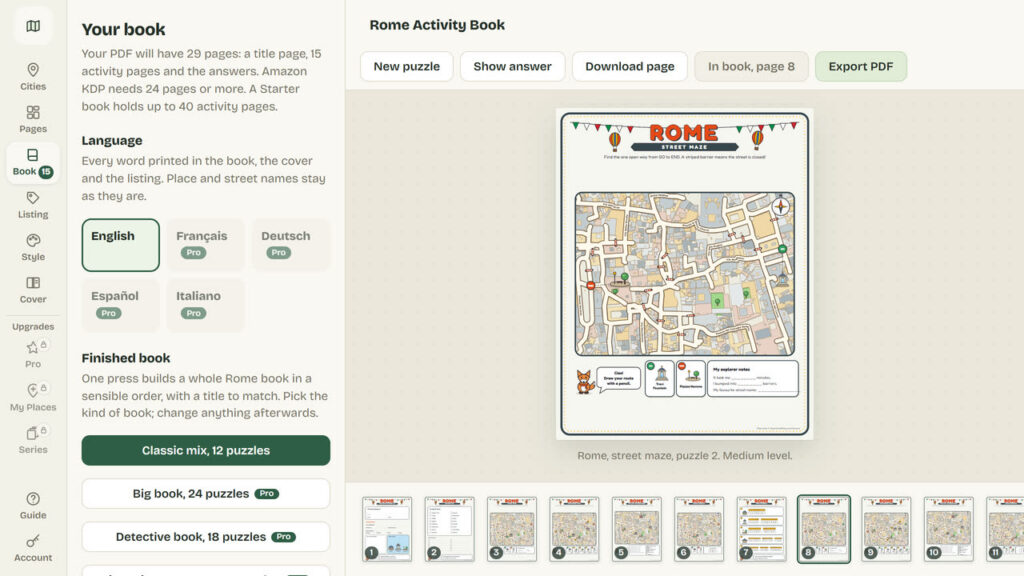
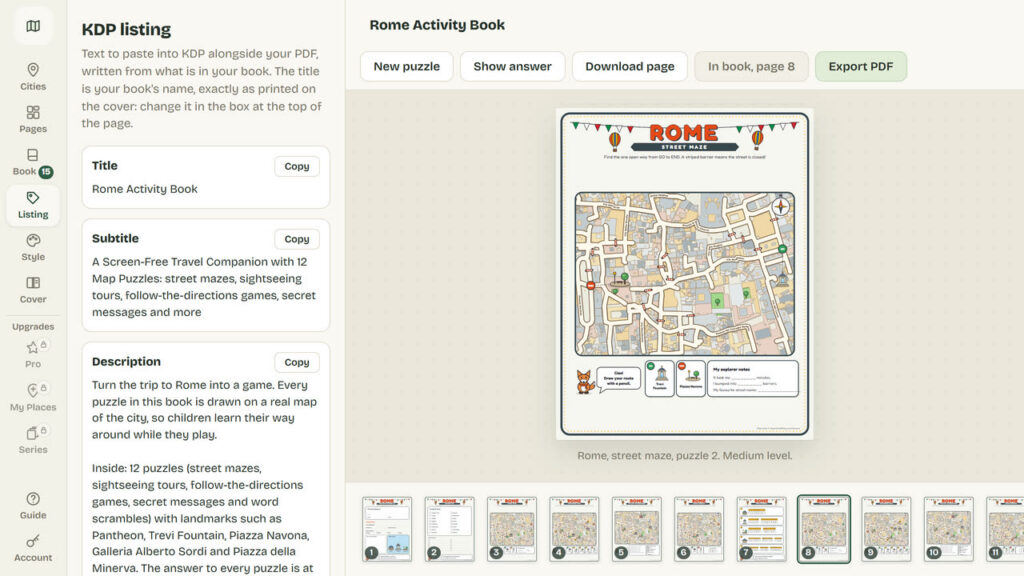
Quick answer: TripDoodle is a browser-based app that uses OpenStreetMap data to draw map-based activity pages and export print-ready PDFs intended for children’s travel activity books. This review is research-based and was not tested hands-on; it is based on the official product page, support pages and the product terms that the vendor publishes.
ReviewScoutLab may earn an affiliate commission if you buy through links on this page, at no extra cost to you.
Product Video
Video detected on the vendor sales page. Availability and video content remain controlled by the vendor.
Product Overview
What it is: TripDoodle is documented as a web app that turns street-map data into puzzle and keepsake pages for children’s travel activity books. According to the official Terms of Use, the app draws pages from OpenStreetMap data and provides print-ready PDF interiors and listing text you can use when you publish books yourself.
Documented source basis: the product’s Terms of Use and support pages on the TripDoodle site (official product documentation) are the primary sources for the factual points in this overview.
Features and What Is Included
Directly documented features (from official product pages and terms):
- Creates puzzle and keepsake pages from OpenStreetMap street data and includes the required OpenStreetMap credit in output (documented in Terms of Use).
- Exports print-ready PDF files formatted for book interiors (the Terms describe 300 dpi PDF export at common page sizes for KDP use).
- Produces listing text intended to help with book metadata and listings (documented on the product page).
- Runs in a web browser; Chrome and Edge on Mac or Windows are the primary tested browsers (support documentation).
- Sold in distinct one-time packages (Starter, Pro, My Places, Series Studio) rather than a subscription model (documented in the Terms of Use).
- User files, pages and settings are saved in the user’s browser; TripDoodle does not keep copies on the vendor servers by default (Terms & support notes).
Limitations and Risks
This section calls out verified limits, vendor-advertised claims that need verification, and practical risks buyers should consider.
Documented limits and responsibilities
- The maps come from OpenStreetMap, which the Terms say can contain mistakes or be out of date; TripDoodle prints the required OSM credit and warns that maps are for play, not navigation (documented).
- Your exported files and settings are stored in your browser; clearing browser data can remove your work unless you download and keep the PDFs or map files (support documentation).
- The vendor states the product is provided without an uptime guarantee and that features may change; the Terms explicitly do not promise uninterrupted availability (official documentation).
Unverified or vendor-only claims you should treat cautiously
The product page contains marketing details (for example, specific price points, demo timings, a stated list-size of cities or exact page counts) that are vendor statements and are not independently verified by this review. Treat those claims as the vendor advertises them; consult the live sales page before buying. Specifically, several promotional specifics appear only on the product page and are vendor copy rather than independently documented facts.
Who This Is For
Short answer: TripDoodle may suit independent authors and small publishers who want a fast way to produce map-based children’s activity pages for print-on-demand platforms and who are comfortable handling book uploads, KDP rules and listing text themselves.
Best for
- Self-publishers who make children’s travel activity or puzzle books and want map-based pages (KDP or similar platforms).
- People who prefer a browser tool with no separate design software required.
- Publishers who accept that they are responsible for final checks, cover and listing approval, and any shop rules.
Who Should Avoid It
Not ideal for
- Buyers who expect the vendor to publish or manage listings for them — TripDoodle provides files and text; you publish and manage listings yourself (documented in the Terms).
- Users who need server-side saving or collaborative, multi-device cloud storage by default — TripDoodle stores pages locally in the browser unless you keep downloads.
- Anyone who requires fully verified claims like guaranteed sales, earnings or acceptance by marketplaces — the Terms explicitly state there is no promise of sales or earnings.
Pricing and Licensing
What the documentation says: the Terms of Use describe TripDoodle packages sold as one-time payments (Starter, Pro, My Places, Series Studio) and state there is no subscription or automatic renewal. The Terms also explain that you receive a personal, non-transferable licence to use the package features while TripDoodle is offered (documented in the Terms of Use).
What remains to check before you buy: exact current prices, any promotional pricing or upgrade details and the current seller support channels. Confirm price and package contents on the live product/sales page because promotional pages can change more often than the Terms document.
Alternatives and Comparisons
How to think about alternatives: the main alternative approaches are (a) using a general-purpose puzzle-maker and combining it with map screenshots and a layout program, or (b) hiring a designer to create map puzzles. TripDoodle is positioned toward convenience: it automates map-to-puzzle creation and PDF export. If you already have a design pipeline or a bespoke map-license arrangement, TripDoodle’s browser-first workflow may add an extra step you do not need.
Compare on these buyer criteria: ease of turning a real place into a printable puzzle, local data control (browser saves), export DPI and dimensions, included listing text, and whether the app includes the OpenStreetMap credit automatically.
Practical workflows: from map selection to published book
This section outlines repeatable, evidence-based steps you can follow if you plan to use TripDoodle as part of a books-on-demand workflow. The steps refer to product behaviors documented in the vendor’s official materials and support pages (see Sources and evidence in the original review).
-
Plan your scope and locations first.
Decide which places you want in the book (cities, towns, neighborhoods, tourist routes). OpenStreetMap coverage varies by area and may include incomplete or outdated data; the vendor’s Terms of Use explicitly note that OSM data can contain mistakes and is provided “as is” (official documentation). Before you build dozens of pages, preview a few representative places to confirm the map look and level of detail you want.
-
Create pages in the browser tool.
TripDoodle runs in a web browser and is documented to work in Chrome and Edge on Mac or Windows (support documentation). Use the browser platform you plan to use for the whole session to avoid cross-browser differences during page creation.
-
Export and verify PDF files immediately.
The Terms describe 300 dpi PDF export at common page sizes suitable for KDP-style print-on-demand (official documentation). After export, open each PDF in a high-quality viewer (not just a browser preview) and zoom to 100% or higher to check line thickness, contrast, and that the OpenStreetMap credit appears where you expect. Do not rely solely on the browser preview; save local copies as soon as possible.
-
Integrate into your layout software.
TripDoodle supplies interior PDFs and listing text (documented on the product page and in the Terms). Import the PDF interiors into your layout program or print-prep workflow to assemble the full book. Confirm DPI, trim size and (if relevant) bleed expectations for your chosen print platform; the product pages describe export at print-quality DPI but do not replace platform-specific cover and bleed requirements.
-
Include required attribution and listing text.
The product automatically includes the required OpenStreetMap credit in output (documented in the Terms of Use). The tool also produces listing text you can adapt for marketplaces (product page documentation). Keep the OSM attribution intact in any commercial use as the Terms indicate that the credit is part of compliant output.
-
Back up exported files outside the browser.
TripDoodle stores pages and settings in your browser by default; the support documentation warns that clearing browser data can remove your work. To avoid data loss, immediately save exported PDFs and any other artifacts to your own cloud or local backup system. Treat the browser storage as a convenience during editing, not a long-term archive.
-
Proof and test on the print platform.
Upload a proof (paper or soft-proof, depending on the service) and check margins, foldability, and readability with actual physical proofs when possible. The vendor’s documentation does not promise acceptance by any marketplace; you are responsible for final checks and marketplace compliance (Terms of Use).
Decision checklist: when TripDoodle is a sensible buy
Use this checklist to decide whether TripDoodle matches your project needs. These items are drawn from the official product documentation and support notes; they reflect how the product is positioned and how it stores and exports content.
- You need a rapid way to turn real-world streets into printable, child-focused puzzle or keepsake pages without manual tracing. (Supported by product documentation describing map-to-page conversion.)
- You are comfortable doing the final publishing steps yourself (cover creation, marketplace listing, compliance). The Terms state TripDoodle provides files and listing text but does not publish on your behalf (official documentation).
- You will maintain your own backups of exported PDFs because TripDoodle saves files in the browser by default and does not keep user copies on vendor servers unless explicitly stated (support documentation).
- You want one-off packages (Starter, Pro, etc.) and do not want an ongoing subscription model; the Terms describe one-time packages rather than a subscription (official documentation).
- You accept that underlying OpenStreetMap data can be imperfect and that maps are intended for play, not navigation (Terms of Use warning).
Comparisons and trade-offs vs alternatives
The original review mentions two broad alternatives: assembling map puzzles yourself using general-purpose tools, or hiring a designer. Here are concrete trade-offs to help you choose.
1) TripDoodle (automated, browser-first)
- Pros: Fast conversion from OSM to printable pages; built-in export to 300 dpi PDF for book interiors; includes OSM credit automatically; produces listing text (official documentation).
- Cons: Browser-only editing and local (browser) storage by default; you remain responsible for final marketplace compliance and uploads; no uptime guarantee in the Terms.
2) General-purpose puzzle/graphics tools + manual map export
- Pros: Maximum layout control and flexibility; you can choose exact styling and composite maps with other graphics; easier to integrate into multi-person workflows with shared cloud storage.
- Cons: More manual work to extract map data, add attribution correctly, and format multiple pages at print DPI. Also requires separate licensing checks for map imagery unless using OSM appropriately.
3) Hiring a designer or agency
- Pros: Professional polish, bespoke layouts, bespoke illustration or enhanced interactivity for digital formats; the designer can handle marketplace formatting and file prep.
- Cons: Higher upfront cost and longer turnaround; repeated projects may cost more than a self-serve tool in the long run.
Which route is best depends on volume and control. For a small series of quick, repeatable books where consistency and speed are priorities, an automated tool documented to export high-resolution PDFs can be a strong time-saver. If you need total design control, unique illustration, or a collaborative workflow with server-side storage and versioning, a manual or designer-led route will usually be a better fit.
Limitations and practical items to validate before purchase
The review’s primary sources list a number of vendor-documented behaviours and vendor-only marketing details.
- Exact export sizes and bleed behaviour: The Terms mention export at 300 dpi for common KDP sizes, but they do not replace platform-specific cover and bleed rules. Confirm which page sizes are included and whether TripDoodle places crop marks or bleed edges where required.
- Data coverage for the places you need: Because TripDoodle relies on OpenStreetMap, the visual result depends on OSM completeness for your target places. The Terms note that OSM data may be incomplete or inaccurate (official documentation). Preview the map output for any lesser-known locations before building many pages.
- Long-term storage for your project assets: TripDoodle saves user files and settings in the browser by default (support documentation). If you expect to access a project from multiple devices or preserve master files without exporting, plan a manual backup workflow (export PDFs, save source files to cloud storage) because the vendor does not keep copies on servers by default.
- Support and availability expectations: The Terms explicitly disclaim an uptime guarantee. If you depend on uninterrupted access for a production deadline, have a contingency plan or build offline elements of your process in advance.
- Terms around licence and transferability: The Terms describe a personal, non-transferable licence for package features (official documentation). If you intend to transfer the project or sell the account, verify licence transfer rules with the vendor.
Backup, collaboration and team workflows
Because TripDoodle saves your work in the browser by default, teams and multi-device workflows need an explicit handoff strategy. Below are practical patterns you can follow.
Single creator, occasional projects
Immediately export PDFs and store them in at least two places you control (local drive + cloud). Keep a short index file listing which PDF corresponds to which place and date created. Do not rely on the browser storage as the only copy.
Small team or repeated releases
- Use a shared cloud folder for exported PDFs and a naming convention that includes place and version.
- Keep a simple manifest (spreadsheet or text file) with page-level metadata so another team member can identify pages, repurpose listing text, and reassemble interiors without returning to TripDoodle editing mode.
- If multiple people must edit base content, centralize the TripDoodle session to a single user who exports assets for others to review and update in a separate design workflow; the Terms indicate TripDoodle does not provide server-side, multi-user saving by default.
High-volume publishers
For scaled output, evaluate whether the workflow of local browser storage plus manual export will meet your throughput needs. The absence of default server copies and the one-time purchase licensing model described in the Terms suggests TripDoodle is designed for creators rather than for automated, high-throughput production with centralized asset management.
FAQ — concise answers with source attribution
- Q: Does TripDoodle keep copies of my files on the vendor’s servers?
- A: According to the vendor’s Terms and support notes (official documentation), user files, pages and settings are saved in the user’s browser by default and TripDoodle does not keep copies on vendor servers unless you export and upload files yourself.
- Q: Will TripDoodle publish my book for me?
- A: No. The product provides print-ready PDFs and listing text that you can use to publish, but the vendor’s documentation and Terms specify you are responsible for publishing, marketplace compliance and any final checks (official documentation).
- Q: Is the OpenStreetMap credit already included in exports?
- A: Yes. The Terms of Use document that output includes the required OpenStreetMap credit (official documentation). Keep that attribution intact as part of compliant use of OSM-derived maps.
- Q: Can I rely on the maps for navigation or up-to-date routing?
- A: No. The Terms explicitly warn that OSM data can contain mistakes or be out of date and that the maps are for play, not navigation (official documentation). Use them only for the intended activity-book context and verify sensitive map facts independently.
- Q: Is there a subscription or is it a one-time purchase?
- A: The Terms of Use describe TripDoodle packages as one-time purchases (Starter, Pro, My Places, Series Studio) rather than as a subscription with automatic renewals (official documentation). Confirm current sales wording on the live sales page before buying, because promotional pages can change more frequently than the Terms.
- Q: Are product pricing, number-of-cities claims, or demo specifics verified here?
- A: Those specifics are treated as vendor-only marketing claims in this review. The review notes that pricing examples and promotional counts appearing on the sales page are vendor statements and were not independently verified; check the live product page for current offers (vendor marketing copy; not independently verified).
- Q: What happens if I clear my browser data?
- A: The support documentation warns that clearing browser data can remove your work. Export and save any PDFs or map files you want to keep before clearing browser data (support documentation).
- Q: Does the vendor guarantee uptime or that marketplaces will accept books made with TripDoodle?
- A: The Terms explicitly do not promise uninterrupted availability and do not guarantee sales or acceptance by marketplaces (official documentation). You are responsible for compliance and for following marketplace rules.
- Q: Can I resell or transfer my TripDoodle package to someone else?
- A: The Terms state you receive a personal, non-transferable licence for the package features while TripDoodle is offered (official documentation). If transferability is important, contact the vendor to confirm current policy before purchase.
Practical examples: typical use cases and how they differ in execution
Below are three compact scenarios showing how a creator might use TripDoodle and what extra steps each scenario will typically require. These scenarios assume the product behaviors documented in the official materials (browser-based editing, PDF export at 300 dpi, OSM attribution included).
Scenario A — A single souvenir-themed children’s activity book for a single city
Steps: create each neighborhood page in TripDoodle, export PDFs, assemble interiors and add a cover in your layout program, upload proof to the print-on-demand service and order a physical proof. Because this is a one-off, keep local copies of every exported PDF and listing text files. Expect to spend most time on cover design and metadata quality; TripDoodle supplies the map interiors and listing-text starts (official documentation).
Scenario B — A small series of regional editions (e.g., 10 towns)
Steps: preview OSM coverage for all 10 towns first to ensure consistent map style and detail; create and export pages in batches; maintain a manifest to track page versions and PDF names; use a consistent naming scheme so different towns’ interiors can be assembled into the correct book files. Because TripDoodle keeps work in the browser by default, exporting and centralizing all PDFs into a shared folder will be critical for team collaboration.
Scenario C — High-volume or repeatable publishing
For volume, evaluate whether TripDoodle’s browser-first, local asset model fits your production operations. If you need automated generation, server-side asset management, or an API, confirm with the vendor whether such features exist. The Terms indicate the product is offered as one-time packages with browser-based saving as default; if your volume workflow requires server-side control, you may need an additional pipeline or a different toolset.
What this review does not confirm
To avoid confusion, here is a short list of items the review did not independently verify and that you should confirm directly with the vendor’s live pages or support team before purchasing:
- Current pricing, promotions and exact package contents as listed on the sales page (vendor marketing copy; not independently verified).
- Specific demo timings, exact counts of included cities or page counts stated in promotional materials (vendor claims; not independently verified).
- Any guarantee, refund period or automatic money-back policy not documented in the Terms of Use as verified source facts (if a refund policy is important, ask the vendor for the current, documented terms).
For any of the items above, consult the product sales page or contact the vendor using the support methods listed on their official site before you buy.
Related reading: EscapeBook All-In Review: What Should You Check? · Kids Activity Book Engine Review: What Is the Catch? · How to Create 4 Book Types With an AI Publishing Studio
Final Verdict
Based on the official product documentation and support pages, TripDoodle is a focused tool for generating map-based puzzle and keepsake pages for printed children’s activity books. The documented strengths are browser access, direct export of 300 dpi PDFs suited to common print platforms, and explicit licensing that lets you publish books you create.
Who should consider it: independent KDP publishers and small creators who want to speed up book creation and who understand they remain responsible for final checks, compliance with marketplace rules and local data storage. Who should skip it: those who expect the vendor to publish on their behalf, need server-side multi-device storage as a default, or expect guaranteed sales from tool use.
Before you buy: check the live sales page for current price and package details, confirm the browser and OS compatibility for your workflow, and make sure you keep downloaded exports backed up. The vendor’s official pages document support contact methods and state support aims; consult those pages if you have questions about delivery or account access.
Sources and evidence: This review is based on the TripDoodle official website (product page), the Terms of Use and Support pages. The vendor states other marketing particulars on the sales page; those statements are vendor claims and have been attributed as such where relevant.
Unverified / vendor-only claims to watch for: pricing examples, specific promotional counts (for example, the exact number of cities or demo timings) and marketing copy on the sales page; treat those as seller statements and verify them on the live product page before purchasing.
Disclosure: This article may contain affiliate links. If you purchase through them, we may earn a commission at no extra cost to you.
Educational guides connected with TripDoodle
Preview of category-related educational resources. Bonus access follows the posted terms.
Explore 10 practical eBooks packed with guides, templates and checklists selected for Independent Buyer Guides.
Discover helpful shortcuts, ideas and ready-to-adapt resources you might otherwise spend hours gathering separately.
Purchase eligibility is verified before bonus access is sent. Affiliate link.
Independent Buyer Guides | Starter Blueprint
A simple orientation plan to understand the moving pieces and take sensible first steps. Includes checklists, guided questions, a decision scorecard and a four-week plan.
Independent Buyer Guides | Decision Guide
Practical questions and tradeoffs to evaluate options without relying on hype. Includes checklists, guided questions, a decision scorecard and a four-week plan.

Independent Buyer Guides | Workflow Playbook
Repeatable processes and checkpoints that make daily work clearer. Includes checklists, guided questions, a decision scorecard and a four-week plan.
Independent Buyer Guides | Questions That Matter
Better questions to uncover gaps, hidden costs and important limitations. Includes checklists, guided questions, a decision scorecard and a four-week plan.
Independent Buyer Guides | Common Mistakes Field Guide
Recognize avoidable missteps and recover with a measured approach. Includes checklists, guided questions, a decision scorecard and a four-week plan.

Independent Buyer Guides | Comparison Workbook
Editable-style worksheets for scoring features, fit and long-term value. Includes checklists, guided questions, a decision scorecard and a four-week plan.

Independent Buyer Guides | 30-Day Action Planner
An achievable four-week plan with review points and clear priorities. Includes checklists, guided questions, a decision scorecard and a four-week plan.
Independent Buyer Guides | Quality Checklist
A documented review framework to catch issues before they become expensive. Includes checklists, guided questions, a decision scorecard and a four-week plan.
Independent Buyer Guides | Measurement Toolkit
Focus on useful signals rather than vanity metrics or impressive claims. Includes checklists, guided questions, a decision scorecard and a four-week plan.
Independent Buyer Guides | Next-Level Roadmap
Prioritize sustainable improvements after the essentials are in place. Includes checklists, guided questions, a decision scorecard and a four-week plan.
Bought TripDoodle Through Our Affiliate Link? We’re Here to Help
If you purchased TripDoodle through our affiliate link and you experience any problem with the product, you are welcome to contact us.
Whether you need help with installation, accessing the product, understanding how a feature works, contacting the product owner or vendor, reporting a technical problem, locating your purchase, requesting a refund, or dealing with another issue related to TripDoodle, we will do our best to guide you toward the appropriate solution.
You can contact ReviewScoutLab directly:
WhatsApp: +91 7889856565
Email: support@reviewscoutlab.com
We want readers who purchase through our affiliate links to know that our relationship does not end after the click. If you have a genuine problem, contact us and we will try to help you understand the next steps or reach the appropriate seller, platform, or support team.