Quick Answer
Product Details
A research-based review of LittleWiz Studio – AI Kids Activity Bundle Maker. Useful for printable sellers and teachers who need multi-level worksheets; verify pricing and refund terms on…
- AI & Software
- Product category: AI & Software
- Buyer check: compare the official feature list with your needs.
- Buyer check: confirm supported devices and platforms.
- Buyer check: review account and setup requirements.
- Buyer check: check current access and delivery details.
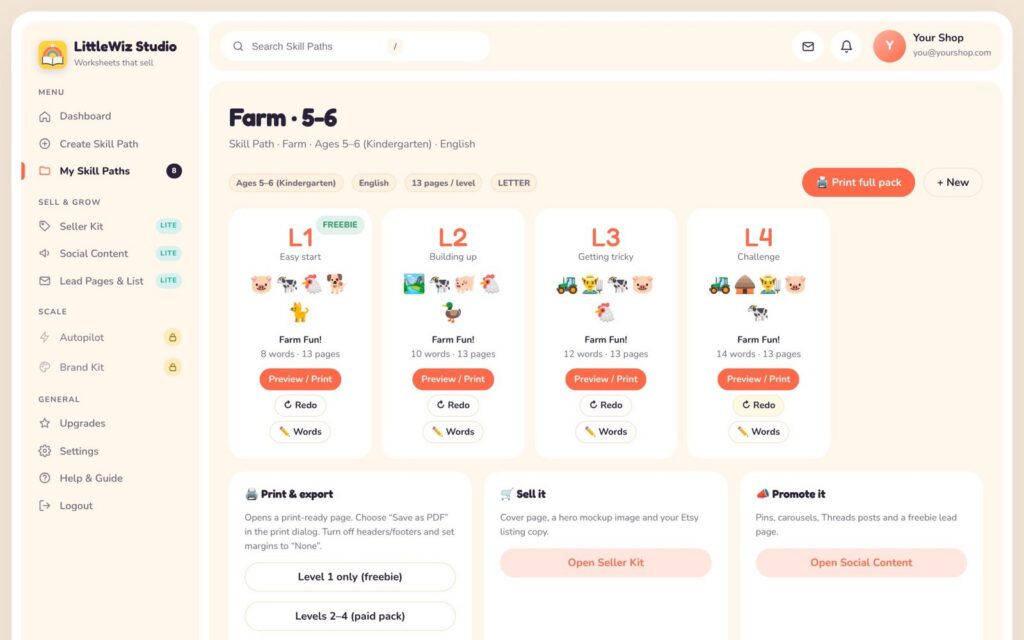
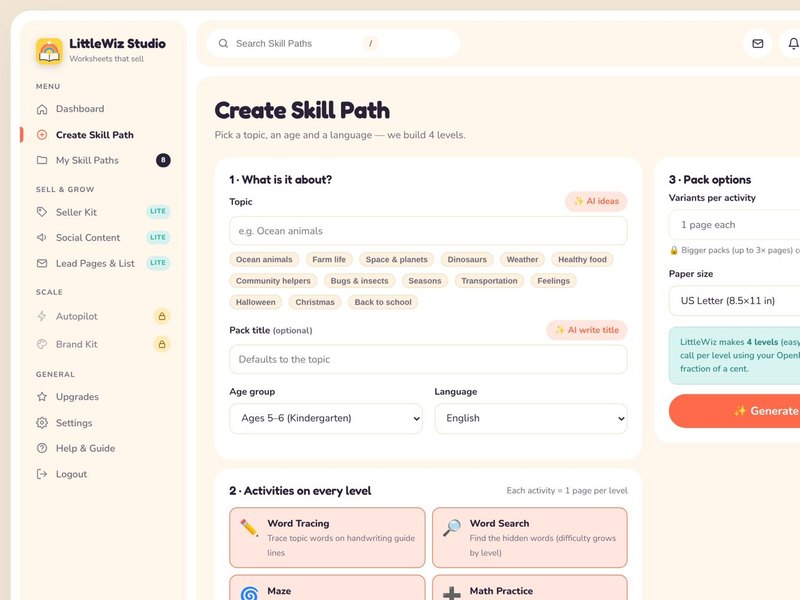
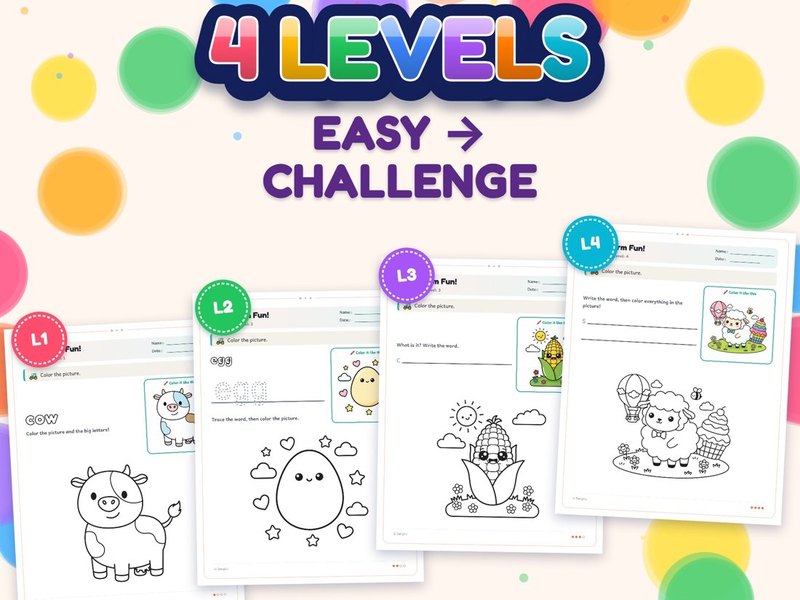
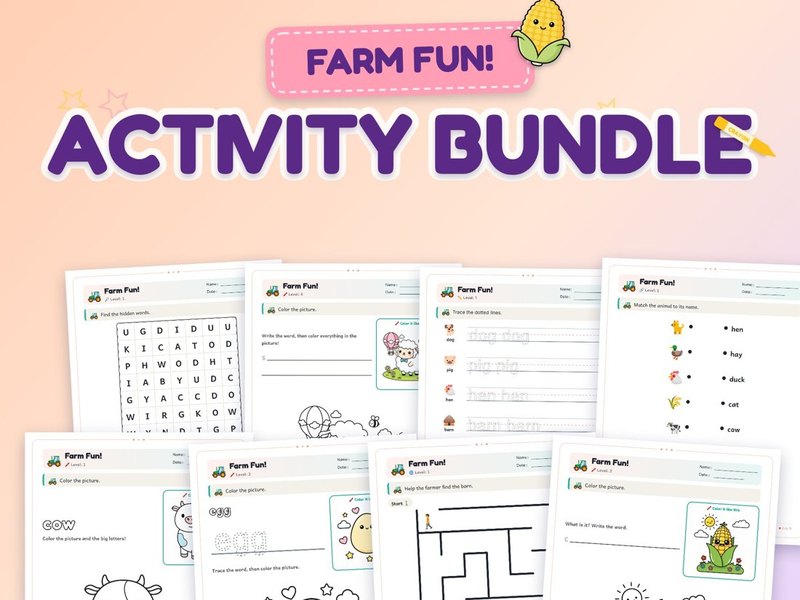
LittleWiz Studio – AI Kids Activity Bundle Maker is a web app that the vendor describes as a tool for generating printable kids’ activity packs (worksheets, covers, mockups and listing content) from a topic and some simple choices. This review is research-based and was not independently tested; it draws on the official product pages, Terms and support documentation.
ReviewScoutLab may earn an affiliate commission if you buy through links on this page, at no extra cost to you.
Product Video
Video detected on the vendor sales page. Availability and video content remain controlled by the vendor.
Product Overview
Based on the official product page and Terms of Service, LittleWiz Studio is a browser-based web application for creating printable educational materials aimed at printable sellers and educators. The documentation states the app builds multi-level activity packs (a four-level “Skill Path”) that include puzzles and exercises plus covers, mockups and listing assets. According to the vendor, output is delivered as print-ready PDF files with answer keys and is intended for sellers on platforms such as Etsy, Amazon KDP and Teachers Pay Teachers.
Real-world scenarios (walkthroughs)
Scenario 1 — An Etsy printable seller: You type a topic like “farm animals”, choose an age range, pick activities (word search, coloring, tracing) and request generation. According to the vendor, the app builds four levels of worksheets, a cover and listing images you can use to publish on Etsy.
Scenario 2 — A classroom teacher creating differentiated practice: You choose an age group and language, generate Level 1 for early learners and Level 4 for higher ability, then download the printable PDF to hand out in class.
Key Features
Documented or vendor-described capabilities cleared from the official pages and Terms include:
- Creates printable educational worksheets, covers, mockups and listing/marketing content (documented on the official product page and Terms of Service).
- Builds multi-level activity bundles (a 4-level “Skill Path”) containing exercises such as tracing, word searches, mazes, math problems, matching and coloring (vendor describes this workflow).
- Produces print-ready PDFs with answer keys (documented in product material).
- Connects to third-party AI models using the buyer’s OpenRouter API key; the Terms state the user provides and pays for that key and is responsible for its usage.
- Targets ages roughly 3–12 and supports multiple languages (the vendor states support for many languages).
- Access and delivery are handled via the product checkout and email notifications processed through the stated sales partner (documented in Terms and Refund & Delivery copy).
Limitations and Drawbacks
Pros and cons below reflect documented facts, vendor statements and gaps in the available evidence.
Pros
- Designed to save time creating multi-level printable activity packs (vendor-stated benefit).
- Outputs are intended to be print-ready with answer keys, which helps sellers and teachers prepare deliverables faster (documented claim).
- User-controlled AI integration (OpenRouter key) lets you pick models and manage costs yourself (documented in Terms).
Cons / Limitations
- Speed, output quality and exact formatting depend on the AI models you connect and on your inputs — those are not independently verified here (unverified).
- Some vendor marketing claims (for example guaranteed correctness of every maze or an exact time-to-create promise) are vendor statements and lack independent confirmation; treat them as vendor copy rather than proven fact.
- The user is responsible for reviewing AI-generated content for accuracy, age-appropriateness, copyright compliance and marketplace rules (documented in the Terms of Service).
Who It Is Best For
Best for:
- Printable sellers who want to speed up production of multi-page activity bundles for marketplaces such as Etsy, Amazon KDP or Teachers Pay Teachers (vendor-targeted audience).
- Teachers or tutors who need differentiated worksheets across age groups and want ready-to-print PDFs with answer keys.
- Creators comfortable with a small amount of setup: choosing activities, age ranges and supplying an OpenRouter API key if they want advanced paid AI models.
Current LittleWiz Studio – AI Kids Activity Bundle Maker Bonuses
These bonus details were listed on the vendor sales page on November 24, 2026. Bonus availability can change, so confirm the live affiliate offer before purchasing.
Bonus 1: Plus 9 exclusive bonuses — ready to print or sell today
Bonus 2: Free with your order
Bonus 3: Get LittleWiz Studio today and these 9 print-ready packs are yours free. Print them for your family or classroom, or edit them and sell them as your own products — a commercial-use license is included with every pack.
Bonus 4: Bonus #1Reward & Chore Chart Pack20 chartsStar charts, morning & bedtime routines, chores by age and reward coupons. Bonus #2Lunchbox Notes & Kindness Cards100 notesEncouragement notes, jokes, fun facts, holiday notes and kindness challenges. Bonus #3Kids’ Journal Prompts Pack200 promptsWriting prompts for ages 5–7, 8–10 and 11–12, plus journal pages and a 30-day challenge. Bonus #4Scavenger Hunt Printables15 huntsIndoor, outdoor, road trip, color, shape, ABC and holiday hunts with pictures. Bonus #5Homeschool Planner15 pagesUndated year, month, week and day planners, 180-day attendance, reading log and more. Bonus #6Classroom Printables Set17 pagesDesk name tags, clip chart, posters, class
Bonus 5: Bonus #8Kids’ Party Games Pack14 pagesPicture bingo, Would You Rather, party trivia, Pictionary and charades cards.
Bonus 6: Bonus #9Etsy Printable Niche Map120 topics10 seasonal topics per month with ages, best marketplace, product angle and when to list.
Bonus 7: PDF · US Letter · print-ready. Delivered with your purchase.
Who Should Avoid It
Not ideal for:
- Buyers who expect fully hands-off, guaranteed-correct outputs without review — the Terms explicitly place content-review responsibility on the user.
- Users who prefer a locally installed offline tool — LittleWiz is documented as a web application that runs in-browser.
- Those who cannot supply or manage an OpenRouter API key when paid AI models are required; the Terms say you are responsible for those third-party charges.
Pricing and Licensing
The official documentation and Terms say products are sold via the indicated checkout platform and that licenses are non-transferable, personal and one-time purchases unless a product page says otherwise. Specific pricing or launch discounts are not reproduced here; confirm current pricing on the official product page at purchase time. Check the seller’s current written refund and eligibility terms before buying.
Alternatives and Comparisons
If you need a different workflow, consider these options to compare against LittleWiz Studio’s documented functions:
- Manual assembly using design tools (Canva, Affinity) — slower but gives full control over every layout and asset.
- Other AI-assisted printable builders or dedicated puzzle generators — may differ on output quality, feature set, or pricing model. Always compare which formats, commercial rights and marketplace rules each tool supports.
Evidence and Key Facts Used
This review relies on the official product pages, Terms of Service, Refund & Delivery Policy and Support documentation published on the vendor’s site. Where the vendor makes promotional claims, those are labelled below as vendor statements.
- Official Terms of Service and product documentation: describes the app as a web application for printable worksheets, the license rules, and the user’s responsibility for OpenRouter/API keys.
- Support & Contact page: lists the vendor contact email and describes support response times and how to request delivery help.
- Refund & Delivery Policy: documents the vendor’s stated refund procedures (this text does not repeat any numeric refund duration; check the seller’s current written terms before buying).
Practical Buyer Checklist (Decision Filter)
- Do I need printable PDFs and multi-level activity packs for sale or class use?
- Am I comfortable reviewing AI-generated pages for correctness and copyright issues?
- Will I manage an OpenRouter API key for paid models if I need higher-quality images or faster generation?
- Do I prefer a browser/web-based workflow rather than an offline desktop app?
- Have I confirmed current pricing, licensing limits and the seller’s written refund/support terms on the official product page?
Expanded Use Cases and Buyer-Fit Guidance
The short product summary covers the basic audiences for LittleWiz Studio. Below are more specific buyer profiles and decision guidance to help you decide whether this tool matches your needs.
Good fits (detailed)
- Part-time printable sellers who list low-to-medium complexity activity packs on marketplaces such as Etsy or Teachers Pay Teachers and want to accelerate page generation. The official product materials describe output as print-ready PDFs and marketplace-focused listing assets (documented on the official product page and Terms of Service), which suits sellers who mainly need PDF deliverables rather than editable source files.
- Classroom teachers or tutors who produce differentiated practice materials for multiple ability levels. The vendor states LittleWiz builds a four-level “Skill Path” (vendor-provided description), which can help create leveled worksheets quickly for in-class printing or handouts.
- Creators experimenting with rapid content iterations who want to prototype multiple topics and activity combinations before committing time to detailed layout and brand design. Because the app is browser-based and claims to generate multiple assets from simple inputs, it may reduce the time needed to get a first draft (documented in product materials).
Less suitable situations
- Buyers who require full creative control over every layout element. If you need pixel-perfect, brand-consistent layouts and want to edit every vector element in a desktop tool, manual assembly in a design app may be better. LittleWiz is documented as a browser/web application (official docs), and its workflow emphasizes generation rather than manual layout control.
- Users who cannot or will not review AI-generated content. The Terms of Service place the responsibility for reviewing AI output, copyright compliance and marketplace rules on the user (documented in the Terms). If you expect guaranteed, hands-off correctness, this product is not a fit.
- Teams requiring offline-only tools. LittleWiz is web-based by the vendor’s description; if you must work offline, choose a desktop application instead (official documentation).
Practical Step-by-Step Workflow (What to expect, and what to do at each stage)
The vendor describes a workflow where you provide a topic and choices and receive multi-level activity packs plus covers and listing assets. Below is a more granular workflow you can follow to reduce rework and ensure outputs meet your needs.
1) Plan before you generate
- Decide target age ranges and the number of levels you want. LittleWiz is described as producing a four-level “Skill Path” (vendor documentation); pick the level-to-age mapping up front so prompts and selections are consistent.
- Choose the activity types to include (tracing, word searches, coloring, mazes, matching, etc.). The vendor lists several activity types in marketing material (vendor-stated); plan a variety that suits your audience so the generator assembles a cohesive pack.
- List any curriculum standards, vocabulary, or themes the pack must follow. Because the user is responsible for accuracy and appropriateness (Terms of Service), bringing a short content brief reduces the chance of unsuitable AI output.
2) Configure AI access (OpenRouter key) and model choices
The Terms state you must supply an OpenRouter API key if connecting to third-party AI models. That key determines the models available and any paid usage you incur (documented in the Terms of Service). Before generating, decide whether to use:
- Free or built-in models (if available) for lower-cost experiments, understanding that quality and speed may differ (this is an operational choice; the impact on output quality is not independently verified).
- Paid/advanced models via your OpenRouter key when you need higher-quality text or image generation; note you are responsible for any third-party charges (documented in the Terms).
3) Generate iteratively and validate content
- Run an initial generation with a small set of activities and review the PDF carefully. The product materials state that output is delivered as print-ready PDFs (documented), but they do not substitute for your review for accuracy, age-appropriateness and copyright compliance (Terms).
- Check the answer keys and all exercises for arithmetic correctness, spelling, and cultural sensitivity. The review cannot independently confirm that every generated item will be correct; the vendor’s marketing claims should be treated as vendor copy where not independently verified.
- Request revisions or re-generate with adjusted prompts if problems appear. Adopt a conservative release process: a test print of a single page before publishing a full pack reduces printing/marketplace issues.
4) Prepare for publishing
- Confirm licensing and commercial usage rules for anything you publish. The official Terms describe license rules and state that products are non-transferable personal purchases unless a page explicitly says otherwise (documented in Terms).
- Verify the files the app delivers (PDF quality, page size, orientation) match your marketplace requirements; the documentation describes PDFs as print-ready but does not specify sizes or margins, so check the delivered file and perform a print test.
- Use the included listing/marketing content if it suits your brand, but rephrase or rework it as needed to match your voice and to avoid content-policy issues on each marketplace (vendor-provided listing assets are part of the product description; not independently verified for marketplace compliance).
Quality Control and Marketplace Compliance Checklist
Because the Terms assign review and compliance responsibility to the user, use this checklist before publishing any LittleWiz-generated pack.
- Spelling and grammar: read every page and answer key.
- Math accuracy: verify calculations, number sequences, and answers in problem sets.
- Age appropriateness: confirm reading level, font size, and task complexity match the age range you intend.
- Cultural sensitivity and imagery: check images and examples for cultural appropriateness and avoid stereotypes.
- Copyright and licensing: confirm any images, clipart or third-party content used in materials are licensed for commercial use or are provided by the product with a clear commercial license. The Terms state the user is responsible for copyright compliance (documented), but the review did not independently verify image-license details for the product.
- Marketplace policies: ensure your listing text and product content meet the specific rules of Etsy, KDP, TPT, etc. The app supplies listing assets according to the vendor page, but marketplace rules change and require your verification.
- Print checks: test-print at actual size to validate margins, line weight and readability. The product documentation describes output as print-ready PDFs (documented) but does not confirm every printer setting or size variation.
Managing OpenRouter and Model Costs
The official Terms of Service note that buyers must supply their own OpenRouter API key and are responsible for charges. That design gives flexibility but shifts cost control to you. Below are practical steps to manage usage and cost risk.
- Start with a low-volume test: Use a small number of generation runs to assess output quality before large-scale generation.
- Choose model tiers intentionally: Higher-capacity models often produce better results faster but can incur greater per-request costs. The choice of model is controlled by the OpenRouter key (documented); the review cannot independently verify which specific models are accessible through the product or their exact costs.
- Monitor API usage: Track OpenRouter usage on your account dashboard and set spending limits or alerts if the provider supports them. This is an account-management recommendation rather than a product claim.
- Use free or lower-cost models for drafts: If possible, generate initial drafts with lower-tier models and reserve higher-tier models for final runs once prompts are refined.
Comparisons and Trade-offs (More than “manual vs automated”)
To make a buying decision, compare LittleWiz Studio across three dimensions: speed, control, and ongoing cost.
Speed
LittleWiz is positioned to be faster than manual creation because it generates entire multi-level packs from your inputs (official product description). Speed gains depend on model choice and your prompt quality — both factors are outside the review’s independent verification.
Control
Manual tools (Canva, Affinity, InDesign) give full control over layout and assets. LittleWiz trades some of that direct layout control for rapid generation of consistent multi-level content. If you require precise brand adherence or vector-level edits, check whether LittleWiz exports editable source files — the documentation confirms print-ready PDFs but does not state whether editable source files (e.g., layered PSD, editable SVG) are provided, so consider that a limitation unless the vendor’s sales page explicitly lists editable-export formats (not documented in the materials used for this review).
Ongoing cost and complexity
Because the app uses your OpenRouter key for third-party AI, ongoing costs are variable and depend on your model use. The Terms state you supply and pay for that key (documented). By contrast, manual creation has labor time costs but fewer variable third-party API charges.
Practical Tips to Reduce Rework and Improve Output
- Standardize briefs: Keep a short template brief you paste into the generator for each topic (age, learning objective, required vocabulary, any words or concepts to exclude). This reduces inconsistent outputs across generations.
- Limit variability per run: Generate one activity type per run or generate one level at a time to isolate issues and reduce the cost of re-running complex multi-asset jobs.
- Save and reuse prompts and templates: If the app provides a way to save settings, reuse them to keep packs consistent.
- Perform targeted edits post-generation: Use a PDF editor for small corrections (typos, font sizes) rather than re-running the full generator when only a few items need adjustment.
- Keep a version history: Store dated copies of each pack you publish. If a marketplace later raises a concern, archived versions help demonstrate your review and modification process.
FAQ — What the official sources do and do not confirm
Q: Does LittleWiz produce editable source files (InDesign, layered PSD, etc.)?
A: The official product documentation confirms delivery of print-ready PDFs with answer keys (documented). The materials used for this review do not confirm whether editable source files are provided, so assume PDFs only unless the product page explicitly states additional export formats.
Q: Am I allowed to sell packs I generate?
A: The Terms of Service describe license rules and state that purchases are non-transferable and personal unless otherwise specified (documented). The review recommends reading the product’s license text on the official sales page to confirm permissions for commercial resale, bundling, or white-label use before publishing on third-party marketplaces.
Q: Does the vendor guarantee the correctness of generated exercises?
A: The vendor makes promotional claims about the product helping create correct materials, but the review treats such marketing copy as vendor statements unless independently verified. The Terms explicitly place responsibility for reviewing AI-generated content on the user (documented). Therefore, correctness is not guaranteed by the vendor in a way that removes your review responsibility.
Q: How does support and delivery work if I have a problem?
A: Support and delivery are handled via the stated sales partner and the vendor’s support contact. The Support & Contact page and Refund & Delivery Policy documented in the product materials describe how to contact the vendor and request delivery help; check those official pages for current procedures and response-time expectations (documented in the vendor’s support resources).
Q: Will the tool work offline or as a desktop application?
A: The official documentation describes LittleWiz as a browser-based web application. There is no documentation in the reviewed materials indicating an offline or desktop version, so assume web-only unless the vendor’s product page states otherwise (documented).
Q: How are refunds handled?
A: The Refund & Delivery Policy is documented on the vendor site and outlines the vendor’s stated refund procedures. This review does not reproduce any numeric refund periods and recommends checking the seller’s current written refund and eligibility terms on the official product page before purchasing (documented).
Q: Is multi-language support guaranteed for all activities?
A: The vendor states the product supports multiple languages (vendor-provided statement). The review did not independently verify the completeness or quality of every language’s output; treat language support claims as vendor copy unless you test them directly.
Final Practical Decision Checklist (Before you click buy)
- Confirm you can and will review every generated page for accuracy, age-appropriateness, and copyright — this is your responsibility per the Terms of Service (documented).
- Decide whether you will supply an OpenRouter API key and manage its costs; check how that affects your ongoing expenses (documented in Terms).
- Verify the file types delivered (PDF confirmed by vendor docs) and whether you need editable sources; if editable sources are required, confirm with the vendor before purchase (not documented in the review materials).
- Check the vendor’s current license language and refund policy on the official sales page to confirm commercial usage and eligibility (documented in vendor materials).
- Do a low-cost pilot run: generate one small pack, validate it end-to-end (print test, answer-key check), then scale if results meet your standards.
Where the review references product features, licensing or delivery mechanics, those points are cited to the official product page, Terms of Service, Support & Contact and Refund & Delivery documentation. Marketing claims by the vendor are referred to as vendor statements where they appear. The review did not independently test the product and did not verify model-specific output quality, speed or cost — these factors depend on the AI models you connect and your inputs (unverified).
Related reading: Clueboo – Memory Escape Book Review: Book Builder? · Kids Activity Book Engine Review: What Is the Catch? · How to Format Maze Book Answer Keys With
Final Verdict
LittleWiz Studio – AI Kids Activity Bundle Maker presents a focused workflow for printable sellers and educators who want to generate multi-level kids’ activity packs along with covers and listing assets. Based on the official product documentation, it combines worksheet generation, mockups and listing content in a browser-based app and uses a user-supplied OpenRouter key for AI model access. That model gives flexibility but also places responsibility for API costs and content review on the buyer.
Who should consider it: printable sellers who want faster pack creation and teachers who want differentiated printable material, provided they review outputs and manage the AI key. Who should skip: people who need guaranteed, hands-off correctness without oversight or who prefer offline-only tools.
Before buying, check the official product page for current pricing, license specifics, and the seller’s current written refund and eligibility terms.
Disclosure: This article may contain affiliate links. If you purchase through them, we may earn a commission at no extra cost to you.
30 practical AI Tools bonus guides for LittleWiz Studio
Access is sent after a qualifying purchase is verified.
Explore 80 practical eBooks packed with guides, templates and checklists selected for AI Tools - 30 Practical Guides.
Discover helpful shortcuts, ideas and ready-to-adapt resources you might otherwise spend hours gathering separately.
Purchase eligibility is verified before bonus access is sent. Affiliate link.
ChatGPT Smart Start
Clear steps and worksheets for better choices.
Prompting That Works
A practical toolkit without exaggerated claims.
AI Research Workflow
Useful examples for everyday work.
AI Content Planner
Understand the essentials and common pitfalls.
AI Email Drafting
Turn important ideas into a workable plan.
AI Image Prompts
Make smarter decisions with a simple checklist.
AI Video Planning
Clear steps and worksheets for better choices.
Build AI Assistants
A practical toolkit without exaggerated claims.
No-Code AI Agents
Useful examples for everyday work.
Everyday AI Automation
Understand the essentials and common pitfalls.
AI Spreadsheet Shortcuts
Turn important ideas into a workable plan.
AI Presentation Builder
Make smarter decisions with a simple checklist.
View the remaining 68 bonus books
Responsible AI Basics
Clear steps and worksheets for better choices.
AI Fact Checking
A practical toolkit without exaggerated claims.
AI Customer Support
Useful examples for everyday work.
AI SEO Workflows
Understand the essentials and common pitfalls.
AI for Freelancers
Turn important ideas into a workable plan.
AI Business Brainstorming
Make smarter decisions with a simple checklist.
AI Meeting Notes
Clear steps and worksheets for better choices.
Your AI Productivity Stack
A practical toolkit without exaggerated claims.
Automated Content Calendars
Useful examples for everyday work.
AI Writing Editor
Understand the essentials and common pitfalls.
AI Data Summaries
Turn important ideas into a workable plan.
AI Workflow Mapping
Make smarter decisions with a simple checklist.
Small Business AI
Clear steps and worksheets for better choices.
Choose the Right AI Tool
A practical toolkit without exaggerated claims.
Reusable AI Prompt Libraries
Useful examples for everyday work.
Privacy With AI
Understand the essentials and common pitfalls.
AI Testing Checklist
Turn important ideas into a workable plan.
AI Learning Companion
Make smarter decisions with a simple checklist.
500 ChatGPT Prompts for Business
Original 50-book bonus library resource
300 Prompts for Digital Marketers
Original 50-book bonus library resource
Automation for Beginners
Original 50-book bonus library resource
100 Practical Business Ideas
Original 50-book bonus library resource
Mastering ChatGPT for Productivity
Original 50-book bonus library resource
Content Creation Blueprint
Original 50-book bonus library resource
200 Image Generation Prompts
Original 50-book bonus library resource
Video Creation Master Guide
Original 50-book bonus library resource
50 Digital Tools for Entrepreneurs
Original 50-book bonus library resource
How to Build No Code Business Agents
Original 50-book bonus library resource
SEO Mastery Beginner to Advanced
Original 50-book bonus library resource
Affiliate Marketing Complete Blueprint
Original 50-book bonus library resource
100 Free Backlink Building Strategies
Original 50-book bonus library resource
Keyword Research for Beginners
Original 50-book bonus library resource
Google Ranking Checklist
Original 50-book bonus library resource
On Page SEO Optimization Guide
Original 50-book bonus library resource
Technical SEO Made Simple
Original 50-book bonus library resource
Affiliate Marketing With Smart Automation
Original 50-book bonus library resource
Blogging for Affiliate Income
Original 50-book bonus library resource
100 Profitable Affiliate Niches
Original 50-book bonus library resource
Digital Marketing Blueprint 2026
Original 50-book bonus library resource
Facebook Marketing Master Guide
Original 50-book bonus library resource
Instagram Growth Strategies
Original 50-book bonus library resource
YouTube Channel Growth Blueprint
Original 50-book bonus library resource
Pinterest Traffic Generation
Original 50-book bonus library resource
365 Social Media Content Ideas
Original 50-book bonus library resource
Email Marketing Automation Guide
Original 50-book bonus library resource
Lead Generation for Beginners
Original 50-book bonus library resource
Google Ads Beginners Handbook
Original 50-book bonus library resource
Copywriting That Converts
Original 50-book bonus library resource
100 Online Business Ideas
Original 50-book bonus library resource
How to Sell Digital Products
Original 50-book bonus library resource
Start a Profitable Blog
Original 50-book bonus library resource
Freelancing With Digital Tools
Original 50-book bonus library resource
Print on Demand Business Guide
Original 50-book bonus library resource
Dropshipping for Beginners
Original 50-book bonus library resource
Build an Online Course With Smart Tools
Original 50-book bonus library resource
How to Create and Sell eBooks
Original 50-book bonus library resource
Ecommerce Business Blueprint
Original 50-book bonus library resource
Build a One Person Online Business
Original 50-book bonus library resource
WordPress Website Creation Guide
Original 50-book bonus library resource
100 Canva Design Ideas
Original 50-book bonus library resource
Landing Page Conversion Secrets
Original 50-book bonus library resource
Website Speed Optimization
Original 50-book bonus library resource
Build Websites Without Coding
Original 50-book bonus library resource
Sales Funnel Building Blueprint
Original 50-book bonus library resource
100 High Converting Email Templates
Original 50-book bonus library resource
Website Security for Beginners
Original 50-book bonus library resource
Smart Website Builder Master Guide
Original 50-book bonus library resource
250 Ready to Use Marketing Templates
Original 50-book bonus library resource
Bought LittleWiz Studio – AI Kids Activity Bundle Maker Through Our Affiliate Link? We’re Here to Help
If you purchased LittleWiz Studio – AI Kids Activity Bundle Maker through our affiliate link and you experience any problem with the product, you are welcome to contact us.
Whether you need help with installation, accessing the product, understanding how a feature works, contacting the product owner or vendor, reporting a technical problem, locating your purchase, requesting a refund, or dealing with another issue related to LittleWiz Studio – AI Kids Activity Bundle Maker, we will do our best to guide you toward the appropriate solution.
You can contact ReviewScoutLab directly:
WhatsApp: +91 7889856565
Email: support@reviewscoutlab.com
We want readers who purchase through our affiliate links to know that our relationship does not end after the click. If you have a genuine problem, contact us and we will try to help you understand the next steps or reach the appropriate seller, platform, or support team.