Quick Answer
Product Details
Product information and buying considerations for Image to Halloween Video.
- prompt formats: a general format plus Kling, Runway, Luma Dream Machine, Pika, Hailuo, Google Veo, OpenAI Sora, Midjourney Video, and Grok Imagine.
- Optional helper prompt for working with an external text AI and attached photo.
- photo types and 60 Halloween looks across 6 groups.
- moods, 8 camera moves, 5/8/10-second lengths, 1–3 takes, background mode, sound line, seamless loop, and costume field.
- Copy one prompt or all prompts and download a .txt file.
- Its offline, single-file mode does not need an account, connected AI, or API key
Research note: This Image to Halloween Video Review is based on the vendor’s public product page, checked October 7, 2026. I have not independently tested the downloadable studio or generated a video. Product features, price, and license claims below are attributed to the vendor and should be confirmed at checkout.
What Image to Halloween Video actually does
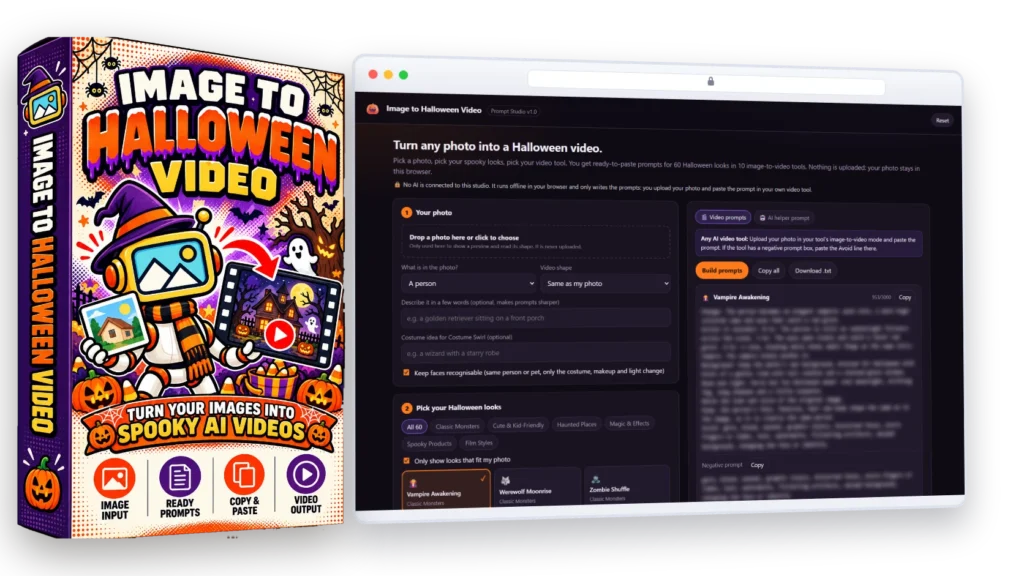
The product name can sound like a video maker, but the vendor describes a prompt studio. You tell it what is in a photo, select one or more Halloween looks, choose a target video tool, and set a few creative directions. The studio then prepares text prompts for you to copy into that separate tool. It does not render, edit, or export a finished video.
Product Video
Video detected on the vendor sales page. Availability and video content remain controlled by the vendor.
That distinction determines the product’s value. If you already have access to an image-to-video generator and spend time rewriting prompts for seasonal ideas, a structured form may help you get to a first draft faster. If you expect one purchase to turn a photo into a finished clip, this is not the complete workflow: you still need a compatible generator, its image input, and any credits or subscription it requires.
The vendor describes a single HTML file that runs offline in a browser and autosaves. I did not test the download or cross-browser behaviour; verify saving and updates if you plan to keep a large prompt library.
Looks, controls, and prompt formats
The vendor lists 60 looks in six groups: Classic Monsters, Cute and Kid-Friendly, Haunted Places, Magic and Effects, Spooky Products, and Film Styles. It also describes nine photo categories, a filter, and a “Surprise me” option. These choices organize ideas; they do not prove prompt quality.
The controls include three moods, eight camera moves, 5-, 8-, or 10-second durations, one to three takes, background options, a sound line, a loop setting, and a costume field. They shape prompt text; an outside model may ignore some instructions. For a clearer test, start with one movement and one effect.
The ten formats are a general prompt plus named versions for Kling, Runway, Luma Dream Machine, Pika, Hailuo, Google Veo, OpenAI Sora, Midjourney Video, and Grok Imagine. The vendor says the wording is adapted for each tool. These are templates, not integrations or access; check the current prompt guidance for the service you use.
The vendor lists copyable prompt cards and a plain text download. That is a portable way to move ideas into another workflow. The page does not establish whether future updates or new looks are included, so ask about support if ongoing compatibility matters to you.
How a typical workflow could look
- Choose a photo you own or are permitted to use, then select the closest subject category.
- Pick a single look and mood. For a child or family image, the vendor says child photos are capped at the Spooky mood and prompts include a no-gore avoid list.
- Select the prompt format for the video generator you actually use. Set one camera move, a short duration, and only the extra details you need.
- Copy the prompt into that generator, attach the photo there, and use the generator’s own controls for image strength, duration, or output shape.
- Review the result for unwanted changes, then revise the prompt in the generator or return to the studio for another variation.
For example, a pet owner could choose a dog photo, a friendly ghost look, Cute mood, and a slow push-in over five seconds. This illustrates a possible setup; I did not generate it with the product, and the external model decides what appears in the clip.
For a useful trial, keep the photo and video service fixed and change one prompt choice at a time. Compare the results before spending credits on many variations.
How to evaluate the prompts before relying on them
The vendor’s page shows the interface and describes its controls, but it does not provide independent test results across every listed video service. That means a buyer should judge the handoff itself: does the generated text describe the chosen photo accurately, give the outside model one understandable action, and put each instruction in a place that model can use? A prompt can look detailed and still be too crowded or mismatched to the service.
A small, controlled test is more informative than a showreel
Start with a photo you have permission to use and that is not sensitive. Choose one look, one mood, one camera movement, and the shortest available duration. Keep the same photo and downstream video service for the first comparison. Before spending credits, read the prompt and check that its subject description matches the photo, the requested movement is clear, and the avoid list does not contradict the scene. The product page says the studio offers a keep-faces-recognisable option, but that wording cannot guarantee identity preservation by an outside model.
After a first render, assess a few observable points: whether the main subject remains recognizable, whether the intended Halloween change is visible, whether the camera move is understandable, and whether the background or hands change unexpectedly. If the result misses, change one setting at a time. This helps reveal whether the prompt format is useful or whether the video service needs more direct editing. Treat a successful single clip as one example, not proof that all 60 looks or 10 formats will behave the same way.
- Read the prompt before copying it; correct a wrong subject description or an unwanted costume detail.
- Check whether your chosen video service accepts the prompt sections and negative prompt in the way the text expects.
- Keep the input photo, service, and duration fixed while changing one look or camera choice.
- Record the service, settings, and result so a second attempt is comparable.
- Stop if the service changes a person’s identity, creates unwanted content, or uses more credits than the result is worth.
This is a buyer’s evaluation method, not a test we performed with the product. It also sets a reasonable expectation: the studio can organize wording, while the downstream model remains responsible for the actual image-to-video output.
Judge the full workflow cost, not the headline price
The prompt studio and the video generator are separate parts of the workflow. The vendor advertises a one-time purchase for its file, while the video service may have its own account, plan, credit, or usage requirements. Add those costs before deciding that the studio is inexpensive. If the checkout still shows $9.95, ten uses would make the studio price about $1 per planning session before video-service costs; at a $37 price, ten uses would be $3.70. These are simple estimates, not promises about the current checkout or the cost of generating clips.
Time saved matters as much as price. If you already know how to write prompts in your chosen service, the studio may mostly provide seasonal ideas. If you regularly switch between tools and need to prepare many variations, its categories and copy/export options may reduce repeated setup. The useful question is not whether the page lists many controls; it is whether you will use them often enough to save time without creating more editing work downstream.
For a PLR buyer, the calculation is different. Rebranding and reselling a studio requires more than obtaining the file: allow for checking the certificate, updating the branding and help text, testing the download, and supporting customers who use different video services. The vendor advertises full PLR for the studio and separate restrictions for the bonuses. Read those documents and confirm the checkout terms before building a commercial offer around them.
Privacy, license, bonuses, and price
Understand where the photo goes
The vendor says the standalone studio works offline and does not upload photos. That applies to the prompt builder itself. If you attach a photo to its optional ChatGPT, Claude, or Gemini helper—or to a video generator—the outside service receives it under its own terms.
Do not use a private or sensitive image unless you understand the destination and are comfortable with its data practices. For photos of children, clients, or recognizable people, get the necessary permission and review the provider’s rules. The studio’s “keep faces recognizable” and no-gore wording can guide a prompt, but an outside model may still alter identity or produce unwanted content.
Read the actual PLR certificate
The sales page advertises PLR for the studio, including rebranding and resale. The certificate and checkout terms define the rights you receive; read them before client or commercial use, especially for modification, distribution, and resale.
The vendor lists five bonuses: Halloween Photo Prep Guide, Photo Fit Check, Video Tool Field Guide, Reel Storyboard Planner, and Image-to-Video Troubleshooter. The stated $255 total is the seller’s valuation. The page says bonuses are for personal or client use and are not covered by PLR or available for resale or giveaway.
PLR for the prompt studio also does not automatically grant rights to the source photo, a generated clip, music, a person’s likeness, a brand mark, or a video model’s output. Those permissions depend on the assets you use and the terms of the relevant service.
Check the live total and any extra costs
On October 7, 2026, the vendor page showed $9.95 and said a dime sale rises toward $37. It describes a one-time payment for the studio. Confirm the live checkout price; the vendor’s $794 combined component value is a marketing valuation, not an independent comparison.
Budget separately for the video generator: this studio does not list video credits or accounts as included. I did not find a clearly stated refund policy in the product details reviewed, so check the seller’s terms before paying.
Advantages and limitations
Potential advantages
- A focused Halloween use case with a defined set of looks and prompt controls.
- The vendor describes a local, single-file studio that needs no connected AI or API key to prepare prompts.
- Several named prompt formats may reduce repeated setup for people who use more than one generator.
- Copy and text-file export make prompts easy to move into another workflow.
- The advertised PLR option may interest digital-product sellers who want a seasonal studio to rebrand, subject to the certificate.
Limitations to weigh
- It writes prompts; it does not make the video or include access to a video generator.
- The Halloween focus may have limited use outside seasonal campaigns.
- Prompt quality and compatibility across all ten formats were not independently tested here.
- Provider terms, prompt preferences, and available features can change; manual editing may be needed.
- Using the optional AI helper or a video generator with a photo sends that photo to an outside service.
- Refund terms, future updates, and practical support details should be confirmed before purchase.
Current Image to Halloween Video Bonuses
These are the current bonus details ReviewScout could verify from the vendor sales page on October 14, 2026. Bonus availability can change, so confirm the live affiliate offer before purchasing.
Bonus 1: Act Now And Get These 5 Fast-Action Bonuses FREE
Bonus 2: Yours free when you grab Image to Halloween Video today. Together they are worth $255, and every one is built around what the studio already does: the photo going in, the prompt it writes and the clip you get back.
Bonus 3: Bonus #1 The Halloween Photo Prep Guide A short PDF guide to the photo that goes in, because the photo decides more of the clip than the prompt does. What to look for in light, framing and resolution, a section for each of the 9 photo types the studio asks about, and a one-page checklist to run before you upload. Value $47 Bonus #2 Photo Fit Check An offline app that looks at your photo before you spend a generation on it. Drop it in and it reads the size, the shape and the brightness right in your browser, tells
you which video shape it suits (9:16, 1:1 or 16:9) and flags a photo that is too small or too dark. Nothing is uploaded. Value $47 Bonus #3 The Video Tool Field Guide A PDF that wal
Bonus 4: Bonus #3 The Video Tool Field Guide A PDF that walks the prompt from the studio into each of the 10 tool formats it writes for: where the photo goes, where the prompt and the negative prompt go, which settings to match (length, shape, sound), and why each format is written the way it is, from Runway's positive-only wording to Hailuo's bracket camera moves. Value $67
Bonus 5: Bonus #4 Reel Storyboard Planner An offline app that turns several short clips into one reel. Pick a 15, 30 or 60 second target, choose looks from the 60, and it lays out the order, the length of each clip, where the cuts fall and a shot list you can follow while you edit. Export it as text or a spreadsheet. Value $47
Bonus 6: Bonus #5 The Image-to-Video Troubleshooter An offline app for the clip that came back wrong. Pick what went wrong (the face changed, hands or limbs warped, the scene barely moved, too much happened, text came out garbled, the background melted) and it tells you which studio setting or prompt change to try next, in plain steps. Value $47
Bonus 7: Bonuses are for your own use, including client work. They are not covered by the PLR license and may not be resold or given away.
Bonus 8: Please note: The dimesale started at $9.95 until we hit $37. The longer you wait, the more you'll pay! 1-Time Payment, No Monthly Fees!
Who may benefit, and what are the alternatives?
This product may fit a buyer who already uses an image-to-video service, wants a library of Halloween directions, and is comfortable copying text between tools. It could also interest a PLR seller who has checked the certificate and can support the product after rebranding. The practical value is convenience: putting seasonal choices, prompt formats, and export in one place.
It is a weaker fit for someone expecting finished clips, a drag-and-drop video editor, automatic publishing, broad year-round creative use, or bundled access to the named AI services. It is also a poor match if you already have a reliable prompt workflow and would not use the Halloween presets enough to justify another purchase.
| Option | What it does | Best fit | Trade-off |
|---|---|---|---|
| Image to Halloween Video | Organizes themed prompt choices and text formats. | Planning Halloween variations with a tool you already use. | A separate service must render the clip. |
| Write prompts in your current generator | Keeps prompt writing and video generation in one service. | People who know their tool and want fewer handoffs. | You create or adapt the Halloween prompt yourself. |
| Use an image-to-video editor or generator | Accepts an image and creates clips, sometimes with editing or export controls. | Buyers who want the actual video workflow. | Features, pricing, privacy, rights, and output quality vary by provider. |
These are workflow categories, not competitor rankings. Compare current provider features and terms.
What to verify before buying
- Preview the output. If a demo is available, compare a general prompt with a tool-specific version and inspect whether the text is editable and easy to copy.
- Check your generator. Confirm that your current video service supports image input, the desired clip length, and the prompt format you plan to use. Check its account tier and credit costs.
- Confirm the file workflow. Ask whether the HTML file works in your browser, what autosave stores, and whether updates or support are included.
- Read the license. Review the actual certificate for resale, client delivery, modification, and distribution rights. Check bonus restrictions separately.
- Review the checkout terms. Verify the final price, whether the dime sale is still active, how access is delivered, and the seller’s refund policy.
- Use an image you are allowed to use. Check privacy and commercial-use terms for the photo, the AI services, any music, and the final clip.
A preview can show the interface, but not prove that every generator will follow its prompts. If output consistency matters, test the actual service and account you plan to use.
Image to Halloween Video FAQ
Does Image to Halloween Video make the finished video?
No. The vendor describes it as a prompt studio. A separate image-to-video generator turns the prompt and photo into a clip.
Are Kling, Runway, Veo, Sora, and the other tools included?
The product page lists prompt formats for those tools. It does not say that their accounts, credits, or video generation are included.
Does the studio upload my photo?
The vendor says the standalone studio works offline and does not upload the photo. If you attach the photo to the optional AI helper or upload it to a video generator, that outside service receives it.
Can I resell the product and its bonuses?
The vendor advertises PLR for the Prompt Studio. Read the certificate for the exact terms. The page says the bonuses are not included in the PLR license and cannot be resold or given away.
What file does the studio export?
The product page lists copyable prompt cards and a .txt download. The studio itself does not export a finished video.
What is the price now?
The page showed $9.95 with a dime-sale increase toward $37 on October 7, 2026. Check the live offer before buying, and account for any separate video-service costs.
Related guide: How to Turn Photos Into Halloween Videos With AI Prompts
Final verdict
Image to Halloween Video is best understood as a seasonal prompt organizer. Its main appeal is the collection of Halloween looks, tool-specific prompt formats, and simple copy/export workflow in a file the vendor says works offline. That may be useful if you already have a video generator and want a more structured way to plan variations.
It is not a video app, and the prompt controls cannot guarantee that an outside model will preserve a face, follow a camera move, or produce a polished result. The advertised PLR terms and bonuses may matter to resellers, but the certificate and checkout terms—not promotional summaries—should guide that decision. Confirm any separate generator costs and privacy implications before uploading a photo.
My assessment: consider it if you specifically need Halloween prompt ideas, already have a compatible generator, and the current price and license fit your use. Skip it if you expect finished clips or included AI-video access. This is a research-based assessment of the vendor’s public information, not a claim of first-hand testing. See the official product page and seller terms for current details.
How this review was prepared: Public vendor information checked October 7, 2026. No first-hand testing or generated-video results are claimed. Affiliate links may earn us a commission at no additional cost to you.
Practical tutorial: How to Turn Photos Into Halloween Videos With AI Prompts.
Disclosure: This article may contain affiliate links. If you purchase through them, we may earn a commission at no extra cost to you.
Bought Image to Halloween Video Through Our Affiliate Link? We’re Here to Help
If you purchased Image to Halloween Video through our affiliate link and you experience any problem with the product, you are welcome to contact us.
Whether you need help with installation, accessing the product, understanding how a feature works, contacting the product owner or vendor, reporting a technical problem, locating your purchase, requesting a refund, or dealing with another issue related to Image to Halloween Video, we will do our best to guide you toward the appropriate solution.
You can contact ReviewScoutLab directly:
WhatsApp: +91 7889856565
Email: support@reviewscoutlab.com
We want readers who purchase through our affiliate links to know that our relationship does not end after the click. If you have a genuine problem, contact us and we will try to help you understand the next steps or reach the appropriate seller, platform, or support team.