Disclosure: This Home Service Agency Studio Review contains affiliate links. If you buy through them, ReviewScoutLab may earn a commission at no extra cost to you.
Check the current Home Service Agency Studio offer
Home Service Agency Studio Review: Product Overview
Home Service Agency Studio is a WordPress website production package for agencies serving local home-service businesses. The central buying question is whether its prepared website materials fit the projects you actually deliver. A reusable starting point can be helpful when clients have similar needs, but it will not remove the responsibility to check content, configure forms, manage hosting or agree a clear project scope.
Our provisional verdict is conditional: consider the package if you already want a repeatable WordPress workflow for small service-company websites and can evaluate a sample before committing. If you need a proven compatibility benchmark, custom application development or independently measured sales results, the public evidence reviewed here does not establish those outcomes. This is a research-based review; we have not purchased, installed or hands-on tested the product.
Documented Facts, Vendor Claims and Unverified Results
Documented offer details: On October 12, 2026, the matching vendor sales page listed seven website styles and ten niche packs, replacing the five-style figure in our earlier draft. It also described prospect demonstrations, personalization and commercial client delivery. These observations verify what the offer page says; they do not independently verify delivered functionality.
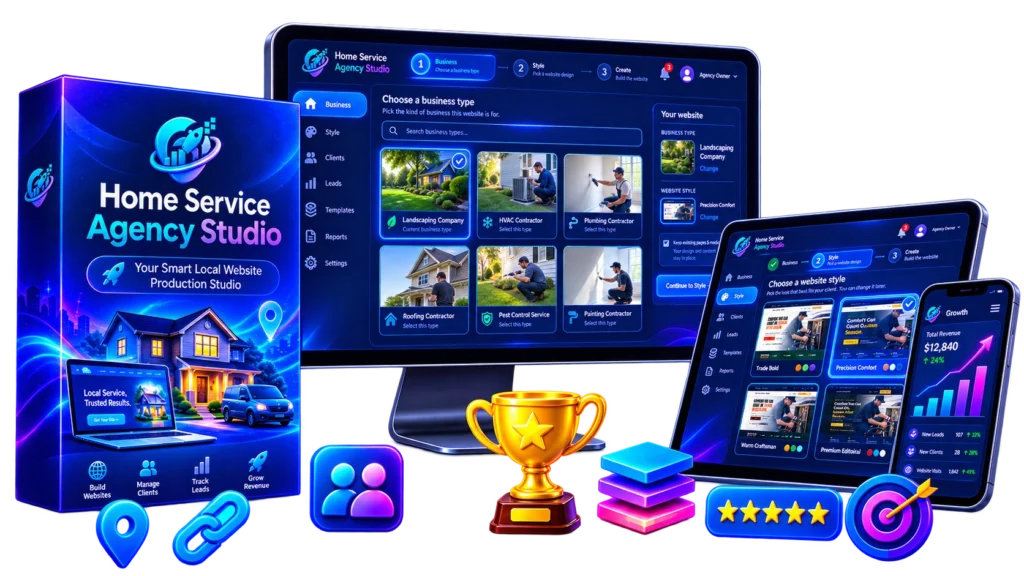
Vendor claims: The vendor presents the package as a way to accelerate website production and reduce dependence on design or coding skills. Any promise about ease, speed, lead generation or client conversion should be assessed through a representative demonstration. A promotional screenshot can explain a workflow, but it does not show how reliably that workflow behaves on your hosting setup.
Not verified in this review: Installation reliability, actual time saved, accessibility compliance, security quality, search rankings, conversion rates and earnings. We also have not inspected the protected delivery files or tested compatibility with another theme or plugin stack. Buyers should request evidence that addresses their particular requirements rather than treating the offer description as a performance report.
The official product page is the source for the offer description. The vendor onboarding guide separately explains site roles and installation. Public documentation makes a purchase easier to investigate, but the availability of documentation is not a guarantee of support quality.
Features: What Matters in a Real Client Project?
The advertised styles and niche materials matter only if they reduce useful work without creating more cleanup. Before buying, choose one business type you expect to serve and compare a sample against its actual needs. Check whether the page hierarchy, service descriptions, contact paths and visual design would survive a realistic client revision.
| Offer element | Practical question to verify |
|---|---|
| Prepared styles | Can you adjust typography, spacing and branding without breaking mobile layouts? |
| Niche content packs | Are the service details accurate for the business, rather than generic placeholders? |
| Prospect demonstrations | Can you control sharing and remove outdated demos cleanly? |
| Client delivery workflow | What remains dependent on your agency after handover? |
A template is most useful when its structure already supports the client’s primary action. For a service website, that action could be a call, a quote request or a contact form. A polished homepage with weak contact information may still fail the brief. Evaluate the practical journey from service page to enquiry instead of judging the product only by its cover artwork.
Ask to see more than the initial installation. Request a demonstration of changing a company name, replacing an image, editing a service area and correcting a form recipient. These small operations are the work you will repeat after a client reviews the first version. Their clarity may matter more than the number of starting designs.
How It Works: A Realistic Delivery Workflow
The vendor onboarding guide distinguishes the agency website from each local-business website and describes separate installers for those roles. Match the installer to the intended site and purchased edition. This distinction is important because a buyer could otherwise confuse the agency’s presentation workspace with a customer’s finished installation.
First, define a bounded brief. Write down required pages, services, locations, contact methods and approval responsibilities before selecting a design. Include who supplies the logo and photographs, who approves factual claims, and what counts as a revision. Without these decisions, a faster initial layout may simply lead to a larger unplanned editing workload.
Second, prepare a representative staging site. Use a site you can restore if onboarding changes its structure. Confirm that the demonstration uses the edition you are considering. Record what was already installed and which components the package adds. This makes it easier to distinguish a product limitation from an unrelated hosting or plugin problem.
Third, personalize the content carefully. Replace example information with facts supplied or approved by the business. Review service descriptions, qualifications, opening hours and coverage areas. Do not present placeholder reviews or sample statistics as the client’s real history. A reusable content pack is a drafting aid; the client’s actual services should determine the finished copy.
Fourth, verify the enquiry path. Submit a non-sensitive test request and check which inbox receives it. Confirm the confirmation message and inspect the experience on a small screen. Review click-to-call links, required fields and error messages. Save a short acceptance checklist so the client can see what was checked and what still needs approval.
Finally, agree the handover. Explain who will own the domain and hosting, who updates WordPress, and what support remains included. Make sure routine edits do not require undocumented access to your own accounts. A client-ready website should be maintainable after delivery, not just attractive in a prospect demo.
Who Should Consider It, and Who Should Look Elsewhere?
The package may fit a freelancer or small agency that repeatedly builds straightforward local-business sites and already has a process for client content and final review. Such a buyer can evaluate whether the prepared materials shorten a familiar task. The value is easier to assess when you can compare the package with your existing production method.
It may also interest someone expanding from marketing services into website delivery. However, a production system does not supply the judgment needed to scope a project or maintain a website. Before selling client work, learn how to manage backups, recover from failed updates and troubleshoot basic form delivery. These responsibilities remain relevant even when a site begins from a ready-made design.
Look elsewhere if a project depends on unusual booking rules, complex account permissions, specialist data integrations or extensive custom functionality. Those needs may justify a custom development plan. Also reconsider the purchase if you expect the software itself to find paying clients or guarantee revenue: that result is not established by the sources reviewed here.
Pros, Cons and Practical Limitations
Potential advantages: A coordinated starting point may help keep similar projects consistent. It can also make the design conversation more concrete because the client can react to a relevant layout. If the editing workflow is clear, an agency may spend less effort repeatedly constructing the same basic page structure.
Tradeoffs: Reusable designs need differentiation, and sample content needs factual review. A broader choice of layouts can be helpful, but it can also increase decision time. The package’s usefulness depends on whether you can make reliable changes, not simply on how many configurations are advertised. Those practical capabilities have not been tested in this review.
Maintenance limitation: A finished WordPress site still needs an owner for updates, backups and troubleshooting. Decide whether your website service includes ongoing care or only initial delivery. A customer may otherwise assume continuing support that you have not priced or staffed. Document that responsibility before accepting a project.
Marketing limitation: Search-oriented features do not establish rankings, traffic or enquiries. Treat any SEO, answer-engine or AI-discovery language as a feature claim to investigate. Inspect the actual page structure, metadata and content quality. Do not promise a client a search position on the basis of a template’s marketing description.
Scope limitation: Faster setup does not mean zero customization. Clients may request additional service pages, different navigation or integrations that are outside the prepared workflow. Establish a process for pricing those changes separately. A package that works well for a small brochure site may be a poor fit for a project with a very different brief.
Pricing, Total Cost and Commercial Licensing
The vendor sales page displayed a $27 promotional price when checked on October 12, 2026. That observation is not a checkout guarantee. Confirm the current price, edition, taxes, currency and any optional upgrades through the affiliate offer before paying. We have not completed a purchase or independently verified the checkout total.
Evaluate total operating cost rather than the download price alone. Hosting, domains, email delivery, backup arrangements and any additional services may sit outside the package. Ask which components are required, which are optional, and which need recurring accounts. A low initial price will not help if the ongoing delivery setup conflicts with your budget or service model.
For a simple planning example, suppose a project takes six hours to prepare and three hours to revise. Saving two setup hours would not remove the seven hours of remaining work. This is an illustrative workload comparison, not a measured result for Home Service Agency Studio. Estimate your likely tasks before deciding whether the purchase would improve your own process.
The offer describes commercial client delivery, but buyers should read the actual written license for their edition. Ask about client ownership, installer redistribution, agency branding and what happens if your account or subscription status changes. A broad marketing phrase should not substitute for the terms that govern the files you receive.
Check the current refund procedure and exclusions before paying. Keep the order receipt and the offer details relevant to your purchase. ReviewScoutLab is an affiliate publisher, not the seller or payment processor, and cannot approve or guarantee a refund. Contact the responsible vendor through the procedure attached to the order.
Alternatives: Compare Delivery Approaches
A conventional WordPress theme or block-pattern workflow may be sufficient if you already have reusable layouts and know how to adapt them. Compare the complete delivery process: importing materials, editing content, configuring forms and maintaining the finished site. The right comparison is not a product-box count, but the work needed to reach an approved result.
A hosted website builder is another approach when the client values an integrated editing and hosting experience. Examine portability, permissions and ongoing fees before choosing it. A custom build makes more sense when unusual requirements dominate the brief. These are alternative approaches, not claims that any named competing product has been benchmarked against this package.
Pre-Purchase and First-Project Checklist
- Choose one realistic client brief and ask for a matching demonstration.
- Confirm the edition, installers, license and required accounts.
- Check ordinary edits, mobile navigation and the enquiry workflow.
- Agree what client data and assets you will need before production.
- Document maintenance and handover responsibilities.
- Use the first project to evaluate your process before committing to a large rollout.
Keep a simple comparison sheet with required features, evidence received, unresolved questions and the cost of your current approach. An unanswered question is a reason to investigate further, not a reason to fill the gap with optimistic assumptions. This is particularly useful when a launch deadline encourages a quick decision.
Home Service Agency Studio Review: FAQs
Is it a replacement for understanding WordPress?
No. Prepared website materials may simplify production, but you still need to manage the installation and review the finished result. If you cannot restore a backup or diagnose a basic contact-form issue, plan how those tasks will be handled before selling delivery services.
Does the current offer contain five or seven styles?
The vendor page checked for this update listed seven. Confirm what your purchased edition delivers. The earlier five-style wording has been removed from this review because it no longer matches the current public offer.
Can a demo prove the tool will win clients?
No. A demo can explain a proposed website, but the decision to buy your service depends on the prospect’s needs, trust and budget. This review does not establish a conversion rate or promise paid projects.
Has ReviewScoutLab tested the installation?
No. Our conclusions are based on the public offer, documentation and practical evaluation questions. We have not conducted hands-on testing or measured performance, and any unverified outcome remains an open question.
Final Verdict: Verify Fit Before Buying
Home Service Agency Studio is worth investigating as a prepared production workflow for agencies delivering similar local-business websites. The useful next step is a representative demonstration and a clear check of the files, edition and license you would receive. The public information is sufficient to explain the offer, but not to establish installation quality, time savings or business results.
Buy only if the package addresses a specific bottleneck you can describe and its requirements fit your existing process. If you already have an efficient template workflow, ask what this package adds before switching. If you need extensive custom development, use a solution chosen around that requirement rather than stretching a generic starting point beyond its intended role.
For related buyer guidance, read our Dead Signal Book Builder review, which also separates advertised deliverables from results that buyers should verify.
Check current pricing and written offer terms
About the Author
Arshid Hussain writes research-based reviews and informational guides for ReviewScoutLab. This review separates documented offer details from vendor claims and practical buyer questions. Its editorial approach focuses on compatibility, licensing, operating cost and fit with the reader’s existing workflow. Promotional descriptions and screenshots help explain an offer, but they do not replace independent testing. Readers should confirm changing prices and written terms before purchasing. No hands-on use, installation benchmark, revenue result or ranking improvement is claimed here. If a product detail appears outdated, it should be checked against the current vendor documentation before being relied upon.