Quick Answer
Game Craft Studio: Documented Facts, Vendor Claims and Unverified Results
Documented offer details: The product name, offer structure and features summarised here come from the vendor’s public sales and checkout pages as published at the time of writing. Launch prices, bonuses and upgrade paths change often, so confirm the current terms on the checkout page before you buy.
Vendor claims: According to the vendor, the package includes: Create fully customizable printable board games for children; Export your creations as print-ready PDFs; Design games with educational themes for ages 4 to 9. Statements about speed, ease of use, earnings, traffic or other outcomes are the vendor’s own claims, reported so you know what is being promised.
Unverified results: Any results the vendor describes remain unverified; we have not seen independent evidence that buyers achieve them. This is a research-based review: we have not purchased the product and have not hands-on tested it.
Product Details
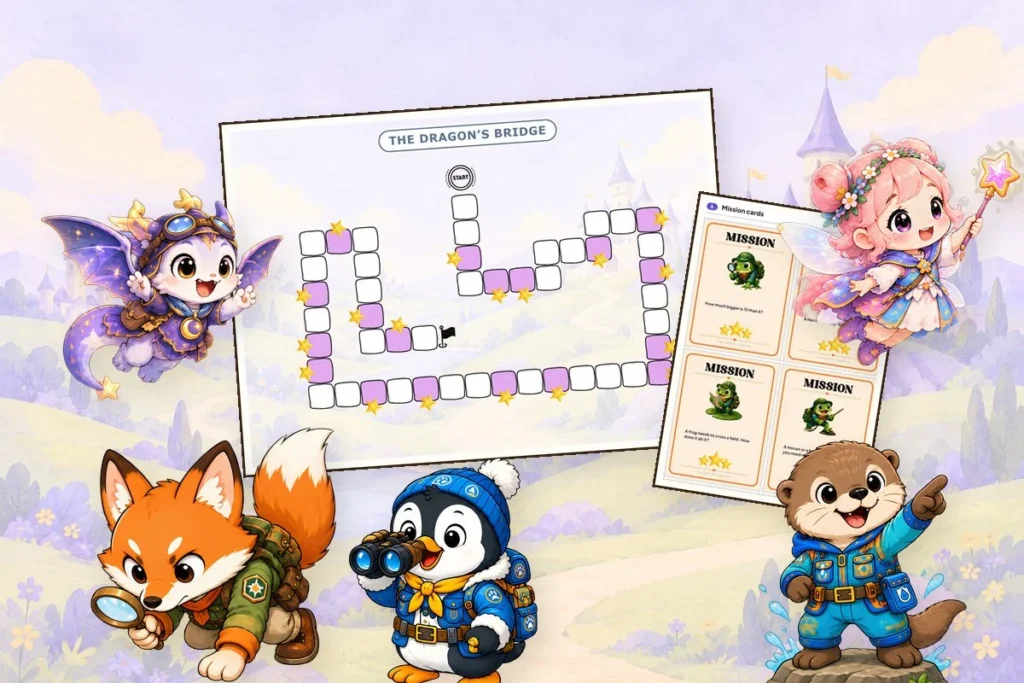
A web app that assembles complete printable adventure board games for children: map, story, rules, a fold-up paper die, up to 90 mission cards, a hero card and…
- Create fully customizable printable board games for children.
- Export your creations as print-ready PDFs.
- Design games with educational themes for ages 4 to 9.
- Commercial rights included to sell finished board games.
- Includes up to 90 unique mission cards.
- No monthly fees – one-time payment only.
Introduction
Game Craft Studio Review reveals an innovative web app designed for crafting complete printable board games for children. This platform provides the tools to assemble a map, a story, rules, and various game components—including mission cards and player tokens—making it an ideal choice for parents and educators aiming to enrich children’s playtime with creative, educational experiences.
What Is Game Craft Studio?
Game Craft Studio is an online application that empowers users to create customizable adventure board games tailored for children. By incorporating up to 90 mission cards and various themed elements, the app allows users to design engaging games quickly and efficiently.
How Does It Work?
The process is straightforward: users select a map, customize the game’s components, and the app assembles everything into a ready-to-print format, eliminating the need for design skills or extensive preparation. The incorporation of rules, missions, and aesthetic elements comes together seamlessly through the platform’s intuitive interface.
Key Features
- Kids can choose from 20+ adventure themes and 12 map layouts.
- Supports the creation of up to 90 unique mission cards to keep gameplay fresh.
- Printable PDF export for easy distribution and setup.
- Age-appropriate content targeting children ages 4 to 9.
- Fully commercial usage rights for selling the finished games.
- Available across multiple languages.
Benefits and Practical Use Cases
This tool is particularly beneficial for teachers, parents, and afterschool program leaders who want to create interactive learning experiences. It’s also an excellent resource for birthday parties and family gatherings where customized games can add a personal touch to entertainment.
Pros and Cons
Pros
- Easy to use, even for those with no design background.
- Inexpensive one-time payment with no subscription fees.
- Encourages creativity and educational engagement among children.
- All materials are printable and instantly exportable.
Cons
- The platform requires an internet connection, limiting offline use.
- Users may need to invest time in learning to use the various features effectively.
Who Is It For?
The Game Craft Studio is ideal for teachers and parents looking for engaging activities to facilitate learning through play. It’s also well-suited for caregivers who wish to foster creativity and storytelling skills in children.
Who Should Avoid It?
This platform may not be ideal for advanced users looking for highly customizable game design or those who prefer traditional board game setups without digital assistance.
Pricing
The app operates on a one-time payment model starting at approximately $17, making it accessible for many users. Expected pricing may vary, and it’s advisable to check the official site for current details.
Alternatives
Alternatives to Game Craft Studio may include traditional board game-making kits or other digital platforms like Tabletop Simulator, which offers refined features tailored for experienced designers.
Frequently Asked Questions
Is Game Craft Studio legitimate?
Yes, Game Craft Studio is a verified application with positive feedback regarding its ease of use and the richness of its features.
Can I create games for commercial use?
Absolutely, the platform grants full commercial rights to users, allowing them to sell the games they create.
Use Cases and Practical Applications
Game Craft Studio excels in various settings beyond just home use. Here are a few practical applications you might consider:
- Educational Settings: Teachers can leverage Game Craft Studio to create themed educational games that align with their curriculum. For example, a math game could turn multiplication tables into a fun adventure, making complex concepts approachable for younger learners.
- Birthday Parties and Events: Custom games can be designed for themed birthday parties, ensuring that the games are tailored to the interests of the birthday child. This personalization can make the celebration even more memorable for guests.
- After-School Programs: Educators in after-school settings can generate new activities regularly, keeping the engagement level high for children who may have differing interests or learning paces.
- Family Bonding: Parents can create games that serve not only as entertainment but also as a means to instill moral lessons or family values, while fostering teamwork and communication skills among family members.
Limitations and Considerations
While Game Craft Studio offers many features, potential users should be aware of a few limitations:
- Internet Dependency: As the platform requires a constant internet connection, users who frequently travel or live in areas with unstable internet may find it challenging to access their games.
- User Learning Curve: Although the app is designed to be user-friendly, first-time users may still find the variety of options overwhelming. A little investment in time to explore tutorials or guides may be necessary to fully harness the app’s potential.
- Age Suitability: The platform primarily targets children aged 4 to 9. Users looking to create complex games for older children or adults might find the design features insufficient.
Comparative Analysis with Alternatives
When considering alternatives like Tabletop Simulator, it’s crucial to evaluate what you specifically need from a game design tool:
- User Skill Level: Game Craft Studio is aimed at families and educators with no design experience, while Tabletop Simulator caters to advanced users comfortable with more complex mechanics and features.
- Game Type: If you’re interested in simple printed board games, Game Craft Studio is ideal. However, for those looking to create digital experiences, Tabletop Simulator provides a more sophisticated platform for interactive gameplay that involves online multiplayer functionality.
- Pricing: Game Craft Studio’s one-time purchase structure may appeal to budget-conscious users, while options like Tabletop Simulator may have subscription or purchase fees that can add up over time.
Workflow Guidance
To maximize your experience with Game Craft Studio, consider the following workflow:
- Conceptualize Your Game: Start by deciding on a theme and objectives for your game. Consider the educational aspects you wish to include if applicable.
- Select a Map and Components: Choose a layout from the available options that fits your theme, and begin selecting mission cards and additional elements that will align with your game’s story.
- Customize the Rules: Ensure that the rules are clear and age-appropriate, keeping the target audience in mind.
- Test Your Game: Before printing, playtest the game with a small group to gather feedback and make necessary adjustments. This step can help uncover any confusing rules or unintended challenges.
- Print and Distribute: Once satisfied, export the game to a PDF format, print it out, and prepare to share it in your desired context.
FAQs
Can I save my games for future editing?
Game Craft Studio typically allows users to save their projects, giving them the flexibility to return and refine them later. This feature can be helpful if you want to update games or make seasonal thematic changes.
Are there templates available for easy game creation?
While Game Craft Studio provides a range of customizable templates to streamline the design process, users can also start from scratch, which may require more initial effort but allows for total creative freedom.
What types of games can I create with Game Craft Studio?
Users can create various types of adventure or educational board games, including trivia games and storytelling adventures. The limit on the number of mission cards allows for diverse gameplay styles.
- Educational Settings: Teachers can leverage Game Craft Studio to create themed educational games that align with their curriculum. For example, a math game could turn multiplication tables into a fun adventure, making complex concepts approachable for younger learners. Additionally, the ability to customize the level of difficulty in mission cards allows educators to cater to different learning levels within a classroom.
- Birthday Parties and Events: Custom games can be designed for themed birthday parties, ensuring that the games are tailored to the interests of the birthday child. This personalization can make the celebration even more memorable for guests. The printable game format also allows parents to easily set up games without needing to purchase expensive premade options.
- After-School Programs: Educators in after-school settings can generate new activities regularly, keeping the engagement level high for children who may have differing interests or learning paces. The variety of themes available can help in providing diverse experiences that help maintain students’ enthusiasm.
- Family Bonding: Parents can create games that serve not only as entertainment but also as a means to instill moral lessons or family values, while fostering teamwork and communication skills among family members. Involving children in the game creation process can also serve as a bonding activity.
- Internet Dependency: As the platform requires a constant internet connection, users who frequently travel or live in areas with unstable internet may find it challenging to access their games. This could be particularly limiting for spontaneous family game nights or traveling teachers.
- User Learning Curve: Although the app is designed to be user-friendly, first-time users may still find the variety of options overwhelming. A little investment in time to explore tutorials or guides may be necessary to fully harness the app’s potential. It may also be beneficial to involve children in the process, allowing them to express their ideas during game creation.
- Age Suitability: The platform primarily targets children aged 4 to 9. Users looking to create complex games for older children or adults might find the design features insufficient. Thus, users may need to adapt their design approach based on the age of the players involved.
- User Skill Level: Game Craft Studio is aimed at families and educators with no design experience. If you’re someone who enjoys detailed, complex game mechanics, you might find that Tabletop Simulator caters more to your interests.
- Game Type: If you’re interested in simple printed board games, Game Craft Studio is ideal. However, for those looking to create digital experiences, Tabletop Simulator provides a more sophisticated platform for interactive gameplay that involves online multiplayer functionality, which may be appealing for gamers seeking online play options.
- Pricing: Game Craft Studio’s one-time purchase structure may appeal to budget-conscious users, while options like Tabletop Simulator may have subscription fees or require multiple purchases which can add up over time. Users should weigh their budget against the features they truly need.
- Conceptualize Your Game: Start by deciding on a theme and objectives for your game. Consider the educational aspects you wish to include if applicable. Think about how you can make the game enjoyable both for children and educationally valuable.
- Select a Map and Components: Choose a layout from the available options that fits your theme, and begin selecting mission cards and additional elements that will align with your game’s story. Pay attention to the color schemes and images used, as these can greatly enhance engagement.
- Customize the Rules: Ensure that the rules are clear and age-appropriate, keeping the target audience in mind. Test different variations of rules to see which create the most enjoyment without leading to confusion during gameplay.
- Test Your Game: Before printing, playtest the game with a small group to gather feedback and make necessary adjustments. This step can help uncover any confusing rules or unintended challenges. Involve children in playtesting to gauge their interest and engagement.
- Print and Distribute: Once satisfied, export the game to a PDF format, print it out, and prepare to share it in your desired context. Consider creating digital copies for online sharing or backup purposes.
Game Craft Studio typically allows users to save their projects, giving them the flexibility to return and refine them later. This feature can be helpful if you want to update games or make seasonal thematic changes. It’s a great way to develop an entire game’s framework and revisit it as needed.
While Game Craft Studio provides a range of customizable templates to streamline the design process, users can also start from scratch, which may require more initial effort but allows for total creative freedom. Templates can serve as a great starting point to spark creativity, especially for users who may feel overwhelmed by a blank page.
Users can create various types of adventure or educational board games, including trivia games and storytelling adventures. The limit on the number of mission cards allows for diverse gameplay styles, encouraging repeat play without losing novelty.
Related reading: LOTTERY DEFEATED SOFTWARE Review: Lottery Defeated Review · How to Create Engaging Picture Worksheets for Kids · 250 Complete Product Prompts That Help Guide for Beginners: 7 Amazing Tips
Reference: FTC endorsement and review guidance.
Final Verdict
In conclusion, our Game Craft Studio Review showcases a valuable tool for creating engaging, educational board games. While it may require an initial learning curve, the resulting benefits make it a worthwhile investment for enriching children’s play experiences.
Disclosure: This article may contain affiliate links. If you purchase through them, we may earn a commission at no extra cost to you.
30 practical Printable Templates bonus guides for Game Craft Studio
Access is sent after a qualifying purchase is verified.
Explore 80 practical eBooks packed with guides, templates and checklists selected for Printable Templates - 30 Practical Guides.
Discover helpful shortcuts, ideas and ready-to-adapt resources you might otherwise spend hours gathering separately.
Purchase eligibility is verified before bonus access is sent. Affiliate link.
Printable Planner Essentials
Clear steps and worksheets for better choices.
Habit Tracker Templates
A practical toolkit without exaggerated claims.
Weekly Family Planner
Useful examples for everyday work.
Simple Budget Worksheets
Understand the essentials and common pitfalls.
Meal Planner Printables
Turn important ideas into a workable plan.
Study Schedule Templates
Make smarter decisions with a simple checklist.
Daily Task Organizers
Clear steps and worksheets for better choices.
Project Planning Pages
A practical toolkit without exaggerated claims.
Teacher Worksheet Ideas
Useful examples for everyday work.
Event Checklist Templates
Understand the essentials and common pitfalls.
Home Cleaning Planner
Turn important ideas into a workable plan.
Reading Log Printables
Make smarter decisions with a simple checklist.
View the remaining 68 bonus books
Creative Journal Pages
Clear steps and worksheets for better choices.
Kids Activity Sheets
A practical toolkit without exaggerated claims.
Printable Goal Trackers
Useful examples for everyday work.
Vacation Planning Pages
Understand the essentials and common pitfalls.
Small Business Forms
Turn important ideas into a workable plan.
Client Intake Templates
Make smarter decisions with a simple checklist.
Digital To Printable
Clear steps and worksheets for better choices.
Printable Design Basics
A practical toolkit without exaggerated claims.
Coloring Page Blueprint
Useful examples for everyday work.
Wedding Planning Pages
Understand the essentials and common pitfalls.
Task Priority Matrix
Turn important ideas into a workable plan.
Office Organization Forms
Make smarter decisions with a simple checklist.
Printable Packaging Guide
Clear steps and worksheets for better choices.
Accessible Print Layouts
A practical toolkit without exaggerated claims.
Monthly Reflection Pages
Useful examples for everyday work.
Organize Your Printables
Understand the essentials and common pitfalls.
Printable Product Bundles
Turn important ideas into a workable plan.
Template Quality Checklist
Make smarter decisions with a simple checklist.
500 ChatGPT Prompts for Business
Original 50-book bonus library resource
300 Prompts for Digital Marketers
Original 50-book bonus library resource
Automation for Beginners
Original 50-book bonus library resource
100 Practical Business Ideas
Original 50-book bonus library resource
Mastering ChatGPT for Productivity
Original 50-book bonus library resource
Content Creation Blueprint
Original 50-book bonus library resource
200 Image Generation Prompts
Original 50-book bonus library resource
Video Creation Master Guide
Original 50-book bonus library resource
50 Digital Tools for Entrepreneurs
Original 50-book bonus library resource
How to Build No Code Business Agents
Original 50-book bonus library resource
SEO Mastery Beginner to Advanced
Original 50-book bonus library resource
Affiliate Marketing Complete Blueprint
Original 50-book bonus library resource
100 Free Backlink Building Strategies
Original 50-book bonus library resource
Keyword Research for Beginners
Original 50-book bonus library resource

Google Ranking Checklist
Original 50-book bonus library resource
On Page SEO Optimization Guide
Original 50-book bonus library resource

Technical SEO Made Simple
Original 50-book bonus library resource
Affiliate Marketing With Smart Automation
Original 50-book bonus library resource
Blogging for Affiliate Income
Original 50-book bonus library resource
100 Profitable Affiliate Niches
Original 50-book bonus library resource
Digital Marketing Blueprint 2026
Original 50-book bonus library resource
Facebook Marketing Master Guide
Original 50-book bonus library resource
Instagram Growth Strategies
Original 50-book bonus library resource

YouTube Channel Growth Blueprint
Original 50-book bonus library resource
Pinterest Traffic Generation
Original 50-book bonus library resource
365 Social Media Content Ideas
Original 50-book bonus library resource
Email Marketing Automation Guide
Original 50-book bonus library resource
Lead Generation for Beginners
Original 50-book bonus library resource
Google Ads Beginners Handbook
Original 50-book bonus library resource
Copywriting That Converts
Original 50-book bonus library resource
100 Online Business Ideas
Original 50-book bonus library resource
How to Sell Digital Products
Original 50-book bonus library resource
Start a Profitable Blog
Original 50-book bonus library resource
Freelancing With Digital Tools
Original 50-book bonus library resource
Print on Demand Business Guide
Original 50-book bonus library resource
Dropshipping for Beginners
Original 50-book bonus library resource
Build an Online Course With Smart Tools
Original 50-book bonus library resource
How to Create and Sell eBooks
Original 50-book bonus library resource
Ecommerce Business Blueprint
Original 50-book bonus library resource
Build a One Person Online Business
Original 50-book bonus library resource
WordPress Website Creation Guide
Original 50-book bonus library resource
100 Canva Design Ideas
Original 50-book bonus library resource
Landing Page Conversion Secrets
Original 50-book bonus library resource
Website Speed Optimization
Original 50-book bonus library resource
Build Websites Without Coding
Original 50-book bonus library resource
Sales Funnel Building Blueprint
Original 50-book bonus library resource
100 High Converting Email Templates
Original 50-book bonus library resource
Website Security for Beginners
Original 50-book bonus library resource
Smart Website Builder Master Guide
Original 50-book bonus library resource
250 Ready to Use Marketing Templates
Original 50-book bonus library resource
Bought Game Craft Studio Through Our Affiliate Link? We’re Here to Help
If you purchased Game Craft Studio through our affiliate link and you experience any problem with the product, you are welcome to contact us.
Whether you need help with installation, accessing the product, understanding how a feature works, contacting the product owner or vendor, reporting a technical problem, locating your purchase, requesting a refund, or dealing with another issue related to Game Craft Studio, we will do our best to guide you toward the appropriate solution.
You can contact ReviewScoutLab directly:
WhatsApp: +91 7889856565
Email: support@reviewscoutlab.com
We want readers who purchase through our affiliate links to know that our relationship does not end after the click. If you have a genuine problem, contact us and we will try to help you understand the next steps or reach the appropriate seller, platform, or support team.