Quick Answer
Product Details
Research-based review of OutSends Complete B2B Outbound Platform. — summary of documented features, the official 14-day WarriorPlus refund policy, vendor claims and buyer guidance.
- OutSends Starter Launch: 10,000 emails/month, 5,000 contacts, 7 senders, P2P warm-up, sequences, unified inbox.
- Marketing & Traffic
- Product category: Marketing & Traffic
- Buyer check: compare the official feature list with your needs.
- Buyer check: confirm supported devices and platforms.
- Buyer check: review account and setup requirements.
Quick summary
OutSends Complete B2B Outbound Platform. Review — This research-based review summarizes the documented features, verified refund terms, and vendor statements for OutSends. It is based on official product pages and documentation; ReviewScoutLab did not independently test the product.
What is OutSends Complete B2B Outbound Platform.?
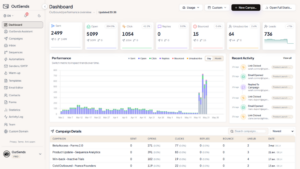
OutSends is presented by the vendor as an outbound email platform for B2B prospecting that combines campaign building, sequences/automation, sender management, warm-up, templates and outreach statistics into one workspace. The product name and feature list are taken from the official OutSends product pages and documentation (see evidence below).
Product Video
Video detected on the vendor sales page. Availability and video content remain controlled by the vendor.
How it works (documented functions)
Based on the official feature documentation, OutSends provides a campaign builder to create multi-step outreach and follow-ups, controls for sending speed and delivery windows, automated triggers and list enrolment, connections for Gmail and SMTP senders with rotation, a P2P warm-up network, template and AI-assisted composition tools, and campaign statistics for opens, clicks and replies. These items are described in the vendor’s product pages and feature documentation; this article treats them as vendor statements unless separately verified.
What you get (documented feature set)
- Campaign builder and multi-step sequences (vendor feature list)
- Sending speeds, smart delivery windows and pacing controls (vendor feature list)
- Gmail/SMTP sender connections, rotation and test-sender preflight (vendor feature list)
- P2P inbox warm-up network with threaded replies (vendor feature list)
- Templates, AI Composer and Spintax support for message variation (vendor feature list)
- Statistics and tracking: opens, clicks, replies, bounces and delivery signals (vendor feature list)
Pricing and refund (verified vs vendor claims)
Refund: The official OutSends refund page documents a 14-day refund policy for purchases made through WarriorPlus; this is an official documented refund term and is reported here as verified documentation. The policy text states refunds for WarriorPlus launch purchases are handled via WarriorPlus and processed within the vendor’s stated procedures. Actual eligibility and processing are controlled by the vendor and payment processor terms; readers should follow the vendor’s refund instructions on the referenced documentation.
Pricing: The vendor’s visible promotional page advertises a $49/year launch price and other launch-rate comparisons. Those pricing and savings claims are vendor-provided promotional statements and are treated here as vendor claims; they are not independently verified beyond the fact the vendor displays them on the product page.
Benefits and practical use cases (analysis)
Analysis: If the documented features are important to you, OutSends may simplify cold-email workflows by combining list management, sequences, automated triggers and warm-up in one workspace. The documented sender rotation and warm-up features aim to protect deliverability when sending at scale. This may be useful for solo prospectors, freelancers, consultants and creators who handle their own outreach and want centralised controls. That suitability is an editorial interpretation based on the listed features, not a tested claim.
Limitations and unknowns
- The vendor promotional page lists launch-rate pricing and numeric limits (emails/month, contacts, included senders) as marketing claims; these numeric details are unverified here and treated as vendor statements rather than independently confirmed facts.
- Third-party integrations, deliverability performance in your environment, inbox-placement rates and real-world results are not independently verified by ReviewScoutLab in this review; outcomes will vary by sender domain, list hygiene, sending patterns and mailbox providers.
- The refund policy is documented as 14 days for WarriorPlus purchases, but actual eligibility and process are controlled by the vendor and the payment processor; follow official refund instructions to request a refund.
Who this might suit
- Solo prospectors who need multi-sender volume and sequence automation (based on vendor feature descriptions).
- Freelancers, consultants and creators who want an integrated warm-up and tracking workflow (vendor statements indicate these capabilities).
- Teams that need a unified inbox and campaign history accessible from one workspace (documented vendor features).
Who may want to skip it
- Organizations requiring independently verified deliverability guarantees or enterprise SLAs — such guarantees are not provided in the supplied documentation.
- Users who prefer solutions with published independent performance benchmarks or public case studies; those items were not supplied in the available reviewed sources.
Alternatives to consider
This review does not list specific competitor names because the supplied reviewed sources did not include verified competitor comparisons. Buyers should compare OutSends’ documented features (campaigns, sequences, sender rotation, warm-up, templates, statistics) against other outbound email and deliverability tools when evaluating options.
Decision checklist — 5 questions to ask before buying
- Does the documented sender authentication and rotation model match your email stack (Gmail, Google Workspace, SMTP)?
- Do you require third-party deliverability benchmarks or independent case studies?
- Will the documented warm-up cycles (P2P network) fit your sending cadence and safety rules?
- Is the vendor’s stated refund process (WarriorPlus 14-day) acceptable, and can you follow the documented refund steps?
- Do you need features not documented in the supplied sources (e.g., advanced reporting exports, API limits)? If so, verify them with the vendor before purchase.
Facts, vendor claims and uncertain items (evidence)
Verified facts (from official product pages and documentation): campaign and sequence features, sending-speed controls, Gmail/SMTP sender connections and rotation, P2P warm-up description, templates and AI composer, statistics tracking, and an officially documented 14-day refund policy for WarriorPlus purchases. These items appear in the product feature pages and the refund documentation supplied in the reviewed sources.
Vendor claims (promotional material): launch pricing and specific numeric package limits (for example advertised $49/year launch price, emails/month, contact counts, “save vs typical” comparisons) are present in the vendor’s sales page and labelled here as vendor-provided promotional claims; they are treated as unverified marketing statements unless confirmed by an independent source or the vendor’s billing documentation.
Unverified/unknown items: independent deliverability rates, real-customer performance metrics, and any third-party benchmarks or long-term pricing beyond the documented launch promotion. ReviewScoutLab did not perform direct product testing for this review.
Pros & Cons (balanced)
Pros (based on documented features)
- Comprehensive documented feature set combining campaigns, sequences, warm-up and tracking.
- Sender rotation and Gmail/SMTP connections appear built-in in the official feature list.
- Documented P2P warm-up network aims to help deliverability for warmed senders.
- AI Composer and template/spintax support are documented for message personalization.
- Official refund documentation references a 14-day refund policy for WarriorPlus purchases.
Cons / cautions
- Pricing and numeric limits shown on the sales page are vendor claims and should be verified before purchase.
- Deliverability outcomes depend on many factors not independently measured in this review.
- No independent performance benchmarks or third-party audits were supplied in the reviewed sources.
Detailed use cases and suggested workflows
This section expands on practical ways teams and individuals could operate OutSends based on the vendor-documented features (campaign builder, sender connections, warm-up network, templates, AI Composer, statistics). The statements below reference the official feature descriptions from the vendor; they are editorial suggestions and not results of hands-on testing.
Use case: Solo prospector running multi-step outreach
Why it might fit: The vendor documentation lists a campaign builder with multi-step sequences, templates and AI-assisted composition, together with Gmail/SMTP sender connections and sender rotation. That combination, if implemented as described, can simplify moving from a list of prospects to a scheduled outreach program without needing several separate tools.
Suggested workflow:
- Prepare a clean prospect list outside the tool (CSV or supported import) and verify contact quality with your chosen list-hygiene process before importing.
- Create a sequence in the campaign builder that includes an initial message and two to three follow-ups spaced according to your outreach cadence. Use templates and Spintax sparingly to personalise at scale.
- Connect one or more Gmail or SMTP senders per the vendor’s documented connection options, and configure sender rotation if you plan to send higher volumes (vendor documentation lists rotation as a feature).
- Enroll senders in the documented warm-up network before sending significant live volume. The vendor describes a P2P warm-up network and threaded replies—use that to reduce risk when warming new senders, per the vendor materials.
- Start with a low sending speed (use the sending-speed and delivery-window controls the vendor documents) and monitor opens, clicks and replies via the platform’s statistics dashboard to adjust cadence and messaging.
Use case: Freelancer or agency managing multiple client inboxes
Why it might fit: The vendor lists multi-sender connections, rotation and a unified workspace—features agencies often need when running campaigns for several clients from client-owned domains or mailboxes.
Suggested workflow and governance tips:
- Use separate sender connections per client to avoid cross-domain deliverability risks. The vendor documents Gmail/SMTP sender connections; ensure each client’s authentication (SPF/DKIM) is configured in their DNS before sending.
- Keep a strict separation of prospect lists per client and document opt-outs and suppression lists externally and within the campaign settings. The product documentation references list enrollment and campaign controls—use them to avoid accidental cross-sending.
- Warm each client’s new sender individually with the P2P warm-up network before moving to live campaigns, per the vendor’s warm-up feature description.
Use case: Small sales team centralising outreach and tracking
Why it might fit: For teams that want a single place to build sequences, rotate senders and monitor engagement metrics, the documented features aim to provide that consolidation.
Suggested workflow:
- Define team roles: who builds sequences, who authorises sender connections, who reviews campaign statistics.
- Create standard templates for outreach and enable AI Composer to draft variations; always review AI-generated content for accuracy and brand tone (the vendor documents AI Composer as a feature).
- Schedule ramp-up sending rates using the sending-speed controls and delivery windows to match real-world follow-up capacity in the sales team—avoid creating follow-up volume the team cannot handle.
Limitations, operational risks and what to verify before buying
The vendor documentation describes many features useful for outbound email, but there remain operational and integration items you should verify with the vendor or by trial before committing. These points are editorial cautions based on what the supplied sources did and did not confirm.
Deliverability is not guaranteed
The vendor documents a P2P warm-up network and sender-rotation controls designed to help deliverability. However, the supplied evidence does not include independent inbox-placement tests or third-party deliverability benchmarks. Deliverability outcomes will vary by sender domain setup, list hygiene, sending cadence, ISP behavior and recipient engagement. Ask the vendor for any additional deliverability data or request a limited pilot to validate outcomes for your sending domains.
Authentication and DNS requirements
Although Gmail and SMTP connections are documented, the review packet does not provide a step-by-step DNS or authentication checklist. Before purchase, confirm with the vendor whether DKIM, SPF and DMARC records are required for each sender type, and whether the platform helps generate or validate necessary DNS entries. If you plan to use client-owned domains, ensure you have access to update DNS records or a workflow to collect and apply authorisations.
Limits and true sending capacity
The product’s sales page includes numeric package limits in promotional material, but those numbers were treated as vendor claims in the supplied sources. Verify current plan limits (emails per month, number of connected senders, contacts) directly with the vendor or in the billing documentation provided at purchase. Confirm how inclusion of multiple senders affects aggregate monthly limits and whether rate limits are applied per sender or per account.
Data exports, backups and portability
The supplied sources list campaign statistics and tracking but do not supply specifics about export formats, retention windows or API access. If you need long-term storage of campaign history, reporting exports (CSV/JSON), or integration with your CRM, ask the vendor which exports and APIs are available and whether exports include full message content, delivery events and reply threads.
Compliance and permissions
The documentation packet does not provide specific guidance on GDPR, CAN-SPAM or other compliance workflows. Confirm with the vendor how unsubscribe handling, suppression lists, and consent records are managed. If you operate in regulated jurisdictions, verify how the product stores personally identifiable information and whether any data processing agreements (DPA) are offered.
Practical onboarding checklist (step-by-step before first live campaign)
Use this checklist to reduce common setup and deliverability risks. Items marked as “vendor-documented” are present in the supplied product documentation; items marked “verify” are recommended checks because the review packet did not fully confirm them.
- Inventory senders and domains: decide which Gmail or SMTP accounts you will connect (vendor-documented sender connections).
- Authenticate each sending domain: verify SPF, DKIM and DMARC settings as required (verify with vendor whether configuration assistance or checks are provided).
- Warm new senders: enrol them in the P2P warm-up network prior to live sends (vendor-documented warm-up feature).
- Prepare prospect lists: clean and deduplicate prior to import; retain suppression lists externally and import where the platform permits.
- Create templates and sequences: author initial messages and follow-ups; use Spintax and AI Composer for variation but human-review all content (AI Composer is vendor-documented).
- Set conservative sending speeds and delivery windows: use the platform’s pacing controls at launch (vendor-documented sending-speed controls).
- Run a small pilot: send to a limited segment to confirm delivery and adjust message copy or cadence as needed before scaling.
- Monitor metrics: watch opens, clicks, replies and bounces in the platform’s statistics dashboard and tweak accordingly (vendor documents statistics tracking).
Buyer-fit guidance and comparison checkpoints
If you are evaluating OutSends against other outbound email tools, focus comparisons on these feature checkpoints that matter for operational fit. The items below are derived from the product features presented in the vendor documentation; use them as a structured checklist when comparing vendors.
Core feature checkpoints
- Campaign builder capabilities: check whether the sequence logic supports conditional steps and automated triggers (OutSends documents multi-step sequences and automated triggers in the supplied material).
- Sender connection types: confirm support for Gmail, Google Workspace and generic SMTP, and whether OAuth or password-based connections are used (OutSends lists Gmail/SMTP connections).
- Warm-up approach: compare whether warm-up is P2P, internal, or third-party, and whether replies are threaded to mimic real engagement (OutSends documents a P2P warm-up network and threaded replies).
- Deliverability controls: check for sending speed controls, delivery windows, sender rotation and test-sender preflight features (OutSends documents these controls).
- Personalisation tools: evaluate Spintax, templating, and AI-assisted composition for scale and quality (OutSends documents templates, Spintax and AI Composer).
- Reporting and exports: ensure the platform provides the metrics you need and allows exporting raw events for CRM syncs (OutSends documents opens/clicks/replies/bounces but export specifics were not supplied).
Organisational fit considerations
- Scale: determine whether the platform’s rate-limiting model fits your anticipated sending volumes; verify plan limits directly because promotional numbers were treated as vendor claims.
- Security: confirm how sender credentials are stored and whether role-based access controls are available for multi-user teams (the supplied sources do not fully describe account security controls).
- Support and SLAs: if enterprise-level response times or uptime guarantees matter, request documentation of support SLAs; the reviewed packet did not include enterprise SLA details.
Extended FAQs — what to ask the vendor (and why)
The vendor documentation supplied in the review packet answers many feature-level questions but leaves practical operational details unconfirmed. Below are targeted questions to ask the vendor, with the reason each matters.
Question: Can you provide a step-by-step guide for authenticating Gmail/Google Workspace and SMTP senders?
Why ask: Proper DKIM/SPF/DMARC setup is essential for deliverability. The review packet documents that Gmail/SMTP connections exist but does not include the DNS or OAuth steps in detail. Request a setup checklist or screenshots.
Question: How does sender rotation work in practice (round-robin, weighted, per-campaign)?
Why ask: Sender rotation strategies affect how quickly you can scale without hitting per-sender limits or deliverability thresholds. The vendor lists rotation as a feature; clarify the specific rotation logic and whether it is configurable per campaign.
Question: Does the warm-up network simulate real replies and engagement from warmed addresses, and what controls do we have over warm-up speed?
Why ask: The vendor documentation references a P2P warm-up network and threaded replies, but you should confirm the degree of control (speed, volume) and how the warm-up traffic appears to mailbox providers.
Question: Are campaign statistics exportable via CSV or API, and how long does the platform retain historical data?
Why ask: For reporting continuity and CRM integration, you will likely need to export or access historical event data. The review packet confirms statistics are tracked, but export and retention policies were not described.
Question: What are the exact plan limits and are promotional launch numbers time-limited?
Why ask: The review packet treated pricing figures on the sales page as vendor claims. Confirm current limits, renewal pricing, and any caps on senders or contacts to avoid surprises after purchase.
Question: Do you provide a data processing agreement (DPA) and what are your data retention/compliance practices?
Why ask: If you handle personal data in regulated jurisdictions, you need clarity on compliance, storage locations, and contractual protections. The supplied sources did not include compliance documents.
Question: Is there a trial or pilot available and how are refunds processed if purchased through WarriorPlus?
Why ask: The supplied refund documentation verifies a 14-day refund policy for purchases via WarriorPlus; however, trial availability or pilot programs were not documented. If a trial is important to you, ask the vendor directly how to access one and whether specific purchase channels affect refund handling.
Final practical considerations before purchase
To summarise the actionable next steps based on the vendor-documented features and the unknowns identified in the supplied sources:
- Request current plan limits, renewal pricing and any time-limited promotional terms in writing (the review packet treated pricing numbers on the sales page as vendor claims).
- Ask for documentation or a demo showing the sender connection and warm-up flow so you can validate how authentication and warm-up will work for your domains.
- Run a small pilot or request trial access if available, paying attention to deliverability signals, bounce handling and how easily you can export reporting data for your CRM.
- If you are an agency or manage client domains, require explicit instructions about DNS configuration, data segregation, and any support available for onboarding client senders.
These steps will help close the knowledge gaps left by the supplied review sources and ensure you make a buying decision that fits your operational needs. Remember that the feature descriptions referenced here come from the vendor’s official product pages and documentation; where the review packet did not supply independent verification, this article flags those items for you to validate with the vendor.
Related reading: Click Flood Rotator 2.0 Review: Who Should Consider It? · AI Affiliate Marketing Blueprint Review: Buyer Verdict · 17 Secret Traffic Methods Nobody In Your Niche Is Using Yet Review: Who Should Consider It?
Reference: FTC endorsement and review guidance.
Final verdict — Is OutSends worth investigating?
Based on the documented feature set, OutSends appears positioned as an all-in-one outbound email workspace with sender management, warm-up, automation and templates. For solo prospectors or small teams wanting those combined controls, it may be a useful option to evaluate. Buyers should verify current pricing, numeric limits and refund eligibility on the vendor’s official pages and consider requesting any additional deliverability evidence they need before committing. This review is research-based and was not produced from first-hand testing.
Affiliate disclosure
Disclosure: This article may contain affiliate links. If you purchase through them, ReviewScoutLab may earn a commission at no extra cost to you.
Sources and evidence
- Official product feature pages and warm-up documentation as supplied in the reviewed sources.
- Official refund & billing policy page documenting a 14-day refund window for WarriorPlus purchases.
Frequently asked questions
Does OutSends offer a refund?
The official refund and billing documentation supplied in the reviewed sources states a 14-day refund policy for purchases made via WarriorPlus. Actual eligibility and processing are controlled by vendor and payment-processor terms; follow the vendor’s documented refund procedure.
Is deliverability guaranteed?
No independent deliverability guarantee is included in the supplied sources. The vendor documents warm-up and sender rotation features aimed at improving deliverability, but inbox placement depends on many variables not independently verified here.
Was the product tested by ReviewScoutLab?
No. This review is research-based and relies on official product pages and documentation provided in the reviewed sources. ReviewScoutLab did not perform hands-on testing for this article.
Next steps
If the documented features align with your needs, verify current pricing, plan limits and refund instructions on the vendor’s official documentation before purchasing. For technical or deliverability questions, request details from the vendor or trial access if available through the official channels.
Disclosure: This article may contain affiliate links. If you purchase through them, we may earn a commission at no extra cost to you.
Practical tutorial: How to build a multistage cold-email campaign and follow-up sequence in OutSends Complete B2B Outbound Platform.
30 practical Email Marketing bonus guides for OutSends Complete B2B Outbound…
Access is sent after a qualifying purchase is verified.
Explore 80 practical eBooks packed with guides, templates and checklists selected for Email Marketing - 30 Practical Guides.
Discover helpful shortcuts, ideas and ready-to-adapt resources you might otherwise spend hours gathering separately.
Purchase eligibility is verified before bonus access is sent. Affiliate link.

List Growth Basics
Clear steps and worksheets for better choices.

Subject Line Hooks
A practical toolkit without exaggerated claims.

Welcome Sequence Wins
Useful examples for everyday work.

AI Assisted Email Marketing
Understand the essentials and common pitfalls.

Newsletter Ideas That Click
Turn important ideas into a workable plan.

Build Better Lead Magnets
Make smarter decisions with a simple checklist.

Email Copy Essentials
Clear steps and worksheets for better choices.

Segment Your Audience
A practical toolkit without exaggerated claims.

Email Funnel Planner
Useful examples for everyday work.

Mobile Friendly Emails
Understand the essentials and common pitfalls.

Trust First Email Copy
Turn important ideas into a workable plan.

Customer Onboarding Emails
Make smarter decisions with a simple checklist.
View the remaining 68 bonus books

Welcome Email Templates
Clear steps and worksheets for better choices.

Email Engagement Tracking
A practical toolkit without exaggerated claims.

Email Automation Basics
Useful examples for everyday work.

Better Newsletter Layouts
Understand the essentials and common pitfalls.

Email Storytelling Ideas
Turn important ideas into a workable plan.

Email A B Testing
Make smarter decisions with a simple checklist.

Reengage Your Readers
Clear steps and worksheets for better choices.

Smart Email Personalization
A practical toolkit without exaggerated claims.

Email Analytics Explained
Useful examples for everyday work.

Improve Email Deliverability
Understand the essentials and common pitfalls.

Ecommerce Email Basics
Turn important ideas into a workable plan.

Affiliate Email Essentials
Make smarter decisions with a simple checklist.

Email Campaign Calendar
Clear steps and worksheets for better choices.

Educational Email Courses
A practical toolkit without exaggerated claims.

Subscription Preference Centers
Useful examples for everyday work.

Ethical Email Persuasion
Understand the essentials and common pitfalls.

Email Marketing Compliance
Turn important ideas into a workable plan.

Evergreen Email Sequences
Make smarter decisions with a simple checklist.

500 ChatGPT Prompts for Business
Original 50-book bonus library resource

300 Prompts for Digital Marketers
Original 50-book bonus library resource

Automation for Beginners
Original 50-book bonus library resource

100 Practical Business Ideas
Original 50-book bonus library resource

Mastering ChatGPT for Productivity
Original 50-book bonus library resource

Content Creation Blueprint
Original 50-book bonus library resource

200 Image Generation Prompts
Original 50-book bonus library resource

Video Creation Master Guide
Original 50-book bonus library resource

50 Digital Tools for Entrepreneurs
Original 50-book bonus library resource

How to Build No Code Business Agents
Original 50-book bonus library resource

SEO Mastery Beginner to Advanced
Original 50-book bonus library resource

Affiliate Marketing Complete Blueprint
Original 50-book bonus library resource

100 Free Backlink Building Strategies
Original 50-book bonus library resource

Keyword Research for Beginners
Original 50-book bonus library resource

Google Ranking Checklist
Original 50-book bonus library resource

On Page SEO Optimization Guide
Original 50-book bonus library resource

Technical SEO Made Simple
Original 50-book bonus library resource

Affiliate Marketing With Smart Automation
Original 50-book bonus library resource

Blogging for Affiliate Income
Original 50-book bonus library resource

100 Profitable Affiliate Niches
Original 50-book bonus library resource

Digital Marketing Blueprint 2026
Original 50-book bonus library resource

Facebook Marketing Master Guide
Original 50-book bonus library resource

Instagram Growth Strategies
Original 50-book bonus library resource

YouTube Channel Growth Blueprint
Original 50-book bonus library resource

Pinterest Traffic Generation
Original 50-book bonus library resource

365 Social Media Content Ideas
Original 50-book bonus library resource

Email Marketing Automation Guide
Original 50-book bonus library resource

Lead Generation for Beginners
Original 50-book bonus library resource

Google Ads Beginners Handbook
Original 50-book bonus library resource

Copywriting That Converts
Original 50-book bonus library resource

100 Online Business Ideas
Original 50-book bonus library resource

How to Sell Digital Products
Original 50-book bonus library resource

Start a Profitable Blog
Original 50-book bonus library resource

Freelancing With Digital Tools
Original 50-book bonus library resource

Print on Demand Business Guide
Original 50-book bonus library resource

Dropshipping for Beginners
Original 50-book bonus library resource

Build an Online Course With Smart Tools
Original 50-book bonus library resource

How to Create and Sell eBooks
Original 50-book bonus library resource

Ecommerce Business Blueprint
Original 50-book bonus library resource

Build a One Person Online Business
Original 50-book bonus library resource

WordPress Website Creation Guide
Original 50-book bonus library resource

100 Canva Design Ideas
Original 50-book bonus library resource

Landing Page Conversion Secrets
Original 50-book bonus library resource

Website Speed Optimization
Original 50-book bonus library resource

Build Websites Without Coding
Original 50-book bonus library resource

Sales Funnel Building Blueprint
Original 50-book bonus library resource

100 High Converting Email Templates
Original 50-book bonus library resource

Website Security for Beginners
Original 50-book bonus library resource

Smart Website Builder Master Guide
Original 50-book bonus library resource

250 Ready to Use Marketing Templates
Original 50-book bonus library resource
Bought OutSends Complete B2B Outbound Platform. Through Our Affiliate Link? We’re Here to Help
If you purchased OutSends Complete B2B Outbound Platform. through our affiliate link and you experience any problem with the product, you are welcome to contact us.
Whether you need help with installation, accessing the product, understanding how a feature works, contacting the product owner or vendor, reporting a technical problem, locating your purchase, requesting a refund, or dealing with another issue related to OutSends Complete B2B Outbound Platform., we will do our best to guide you toward the appropriate solution.
You can contact ReviewScoutLab directly:
WhatsApp: +91 7889856565
Email: support@reviewscoutlab.com
We want readers who purchase through our affiliate links to know that our relationship does not end after the click. If you have a genuine problem, contact us and we will try to help you understand the next steps or reach the appropriate seller, platform, or support team.